Instructions for Reviewers
Public information for iLRN Reviewers, including EasyChair and Review Guidelines.
- EasyChair for Reviewers
- Switching between tracks and roles
- Adding your reviews as a reviewer (PC member)
- Choosing your topics as a reviewer (PC member)
- Meta reviews for leading reviewers
- Account creation and access issues
- iLRN Conference - Review instructions
- Reviews for Academic Stream - Full & Short Papers (Oral Presentation)
- Reviews for Academic Stream - Extended Abstracts (Poster Presentation)
- Reviews for Academic Stream - Doctoral Colloquium Paper (Oral Presentation in DC session)
- iLEAD 2026 Conference Review Criteria (Immersive Learning Education, Arts & Design-Focused)
- Industry Product Demonstrations Policy
EasyChair for Reviewers
Switching between tracks and roles
In EasyChair, different tracks may be used, for example for different submission types. If you are a reviewer in more than one track, it may be necessary to switch between those tracks to see the different submissions that have been assigned to you in the different tracks.
Upon logging in, the different roles for this and other conferences may already be displayed - here, you only need to choose the correct role/track in which you would like to login. Once you have selected a role, you can switch to another role by hovering over the "EasyChair" menu item and clicking on "My recent roles" in the drop down menu:
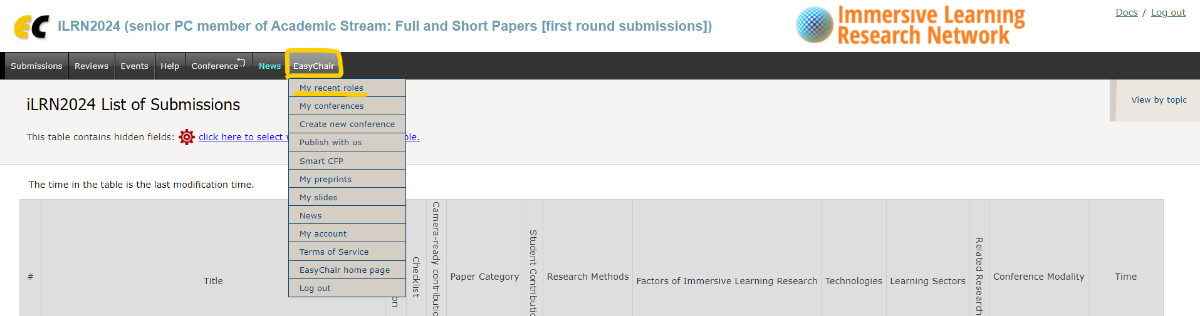
You then get back to the list of roles in the different tracks. You can now switch to the next track.
Note: if you have not visited a role in a while, you might need to click on "All Roles" in the right top corner menu on the page with the listed roles.
Adding your reviews as a reviewer (PC member)
When accessing EasyChair, please click on the PC member role in which you want to add a review:
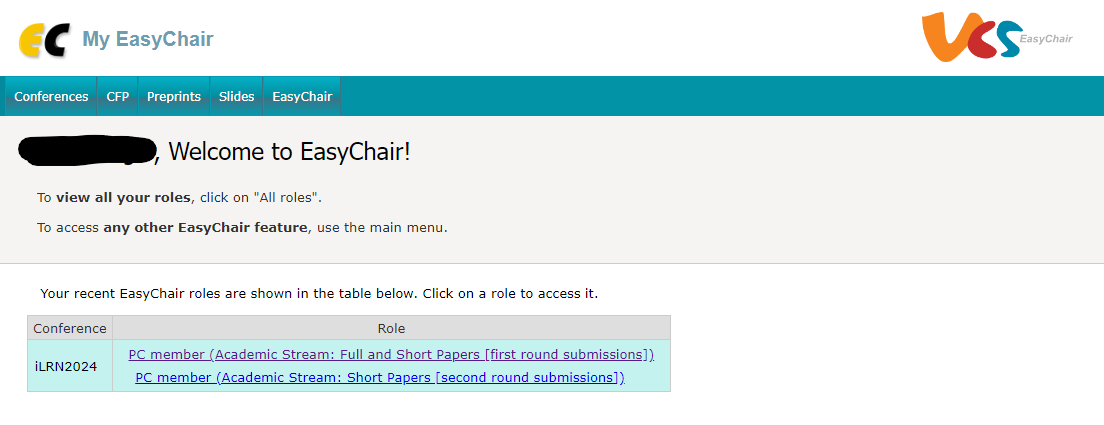
If reviews have been assigned to you in more than track, you need to access the roles separately to submit reviews to those tracks.
After clicking on the respective role, you will see a list of submissions that have been assigned to you in that role. When clicking on "Assigned to me" item in the the "Review" tab in the horizontal menu, you will see this list again, but this time, a little "+" sign in the right most column gives you the option to add a new review for this submission.
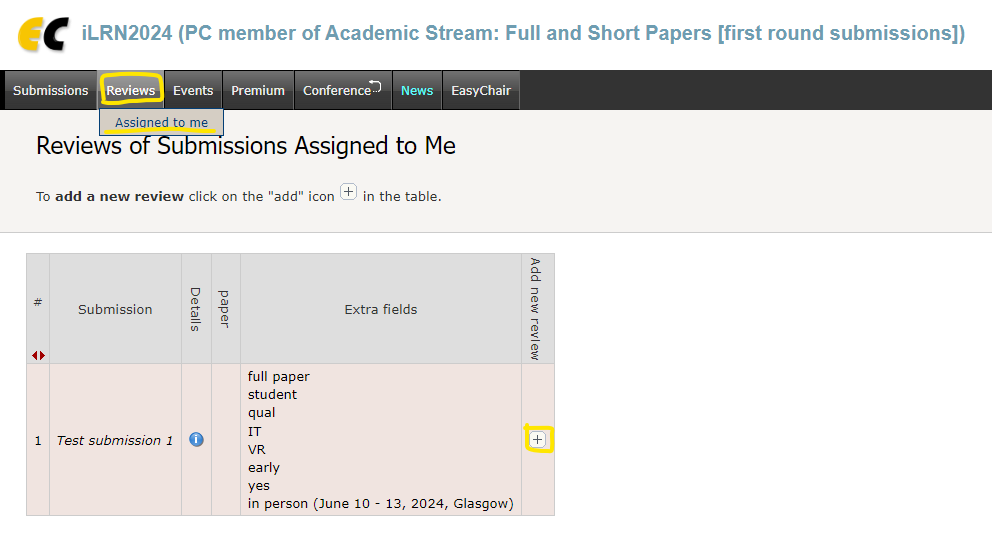
When clicking on that "+" sign, a new page with the review form will open. On top, you can find the Reviewer Instructions. In the form below, you will find review criteria to review and rate the paper, and some open text fields to describe your ratings. It is also possible to attach a document with further feedback, if you want that.
Choosing your topics as a reviewer (PC member)
The topics based on the iLRN conference tracks and branch houses (https://www.immersivelrn.org/initiatives/houses-of-application/) will be used to assign papers to you for review, so that you can review the papers which fit your areas of expertise and interest. If you do not set your topics of interest in the system, we assume that you are open to review submissions from all topics.
When you log in to EasyChair, you should be able to see the current iLRN as your conference, and your role in it as a PC member in the respective track, for example like this:
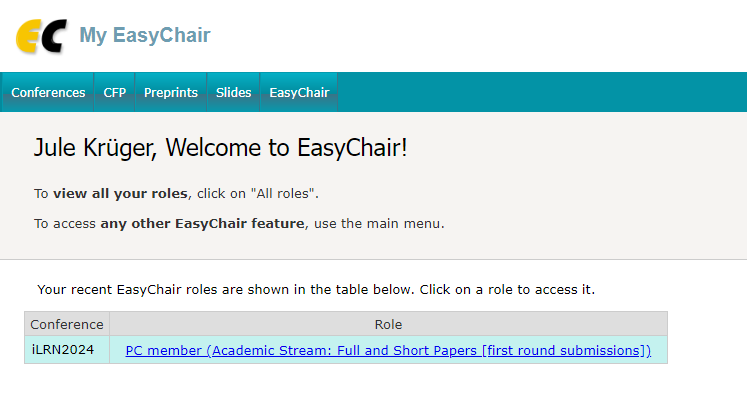
In this view, you might see more than one conference, if you have used EasyChair in other conferences, or you may see multiple roles in the iLRN conference, for example if you are a PC member in multiple tracks or also submitted a paper as an author. If you do not see the iLRN PC member role that you think you should see, try clicking the "All roles" link in the top right corner (not in this screenshot). If you still do not see the role, you might still need to accept your invitation to the Program Committee. Contact conference@immersivelrn.org if you still have issues with finding the role.
IMPORTANT: If you are a PC member in multiple tracks, you need to set your topics in each of them.
When you click on the PC member role, you get to a view with multiple horizontal menu items on top, including "Submissions", "Reviews", etc. There, you should also find the item "Conference". When you hover over it, there is a drop-down menu with the option "My topics":

When you click on that, you get the option to choose the topics you would like to review, which are based on the iLRN tracks (see example below). You need to click the "Save selection" button to save the topics in your profile.
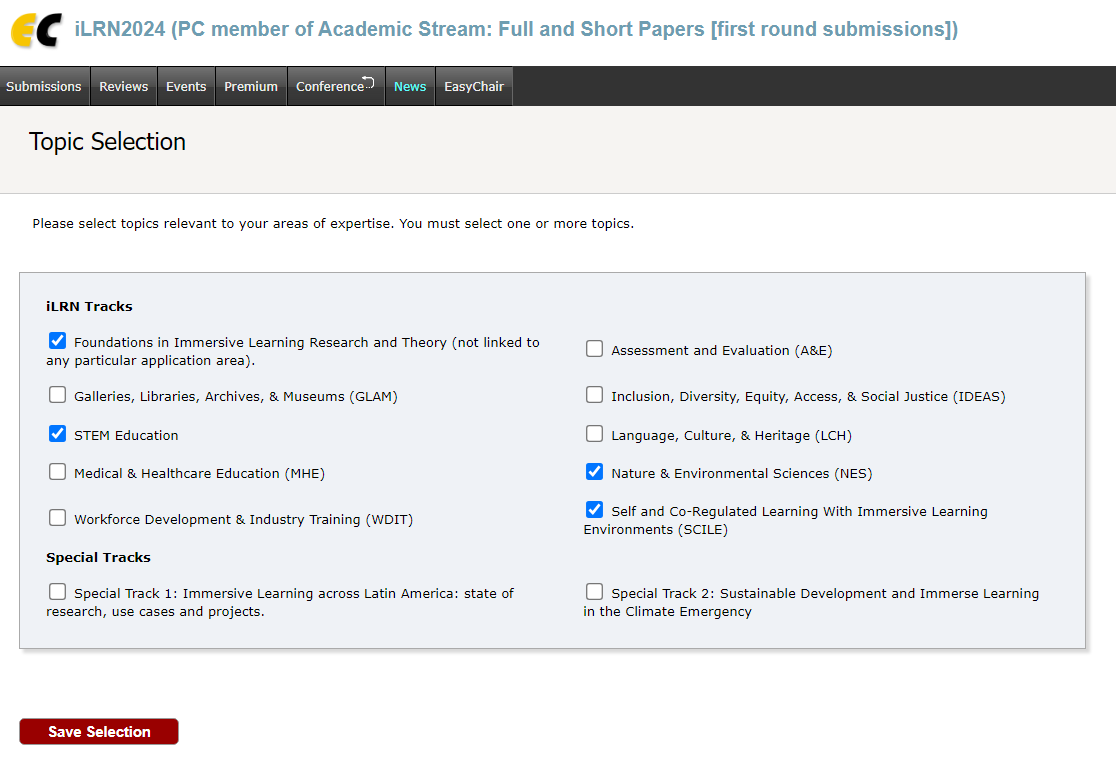
You can still change your topics until the papers are assigned.
Meta reviews for leading reviewers
If you want to see which papers you have been assigned to as leading reviewer, please check under "leading reviewers" in the "Reviews" menu:
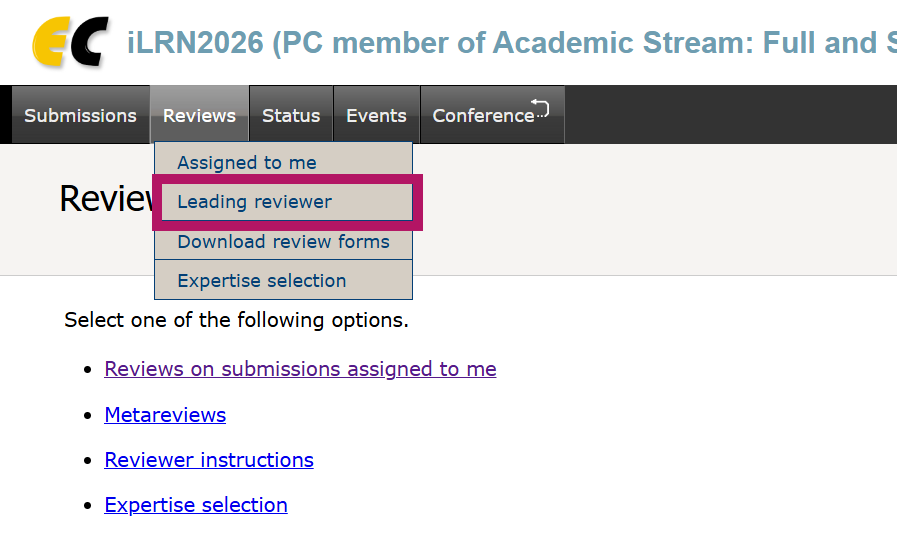
Adding meta reviews
In order to add meta reviews in the system as a leading reviewer, you need to get to the review overview pages of the individual papers. To access these, you can go through the "Submission" menu, the "Reviews" menu, or the "Status" menu.
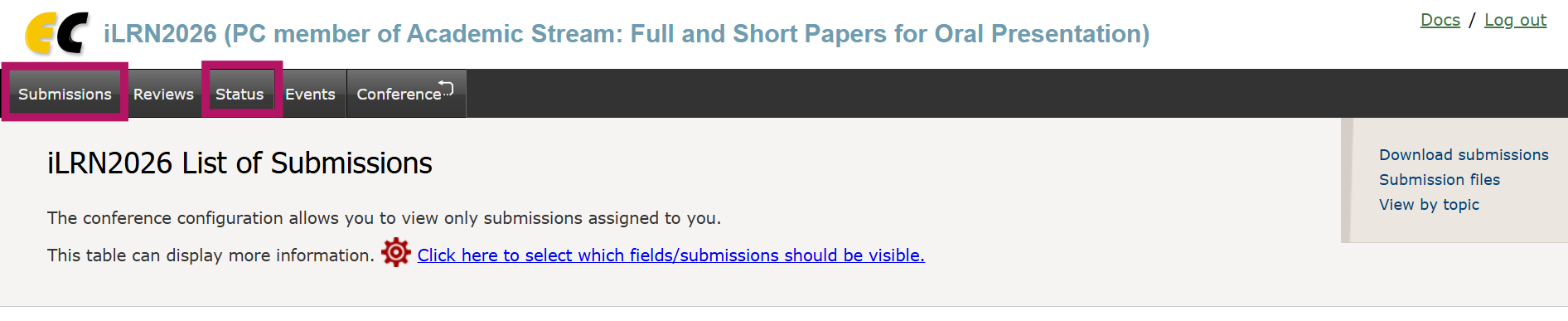
Through submissions menu
In the table with the List of Submissions, click on the symbol in the "Reviews" column:
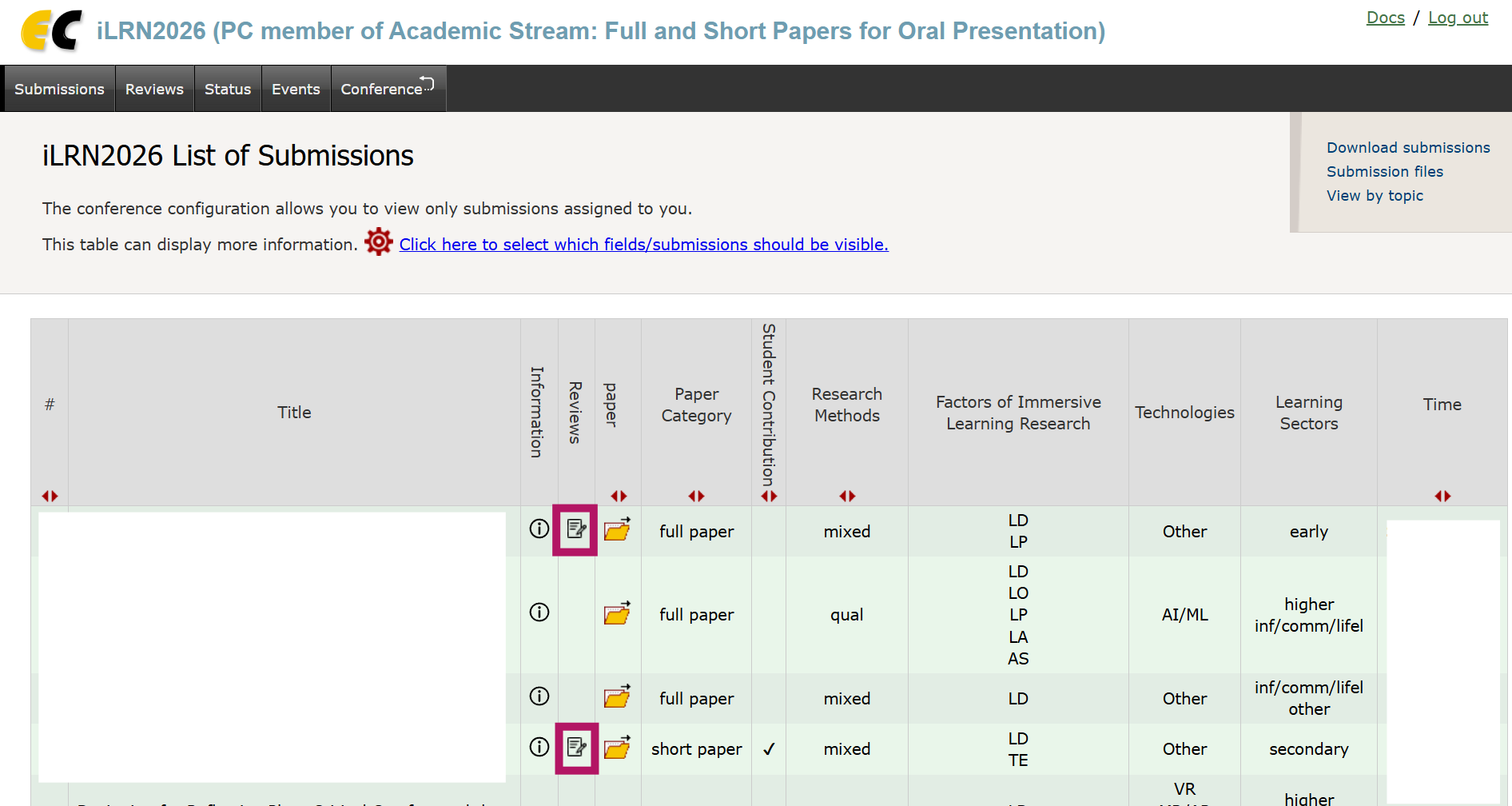
You can only access this button for papers for which you have submitted an ordinary review for that paper yourself. When you click on the symbol, you will get to the review overview page for that paper. From there, continue as described below.
Through "Assigned to me" or "Leading reviewer" menu items, you will also get to tables similar to the ones in the Submission List menu. Again, the symbol in the "Reviews" column can be clicked to get to the review overview page for that paper. From there, continue as described below.
You can see the overview of papers for which you can access other reviews in this menu. When you click on a paper title, you will get to the review overview page for that paper. From there, continue as described below.
On the individual review overview page
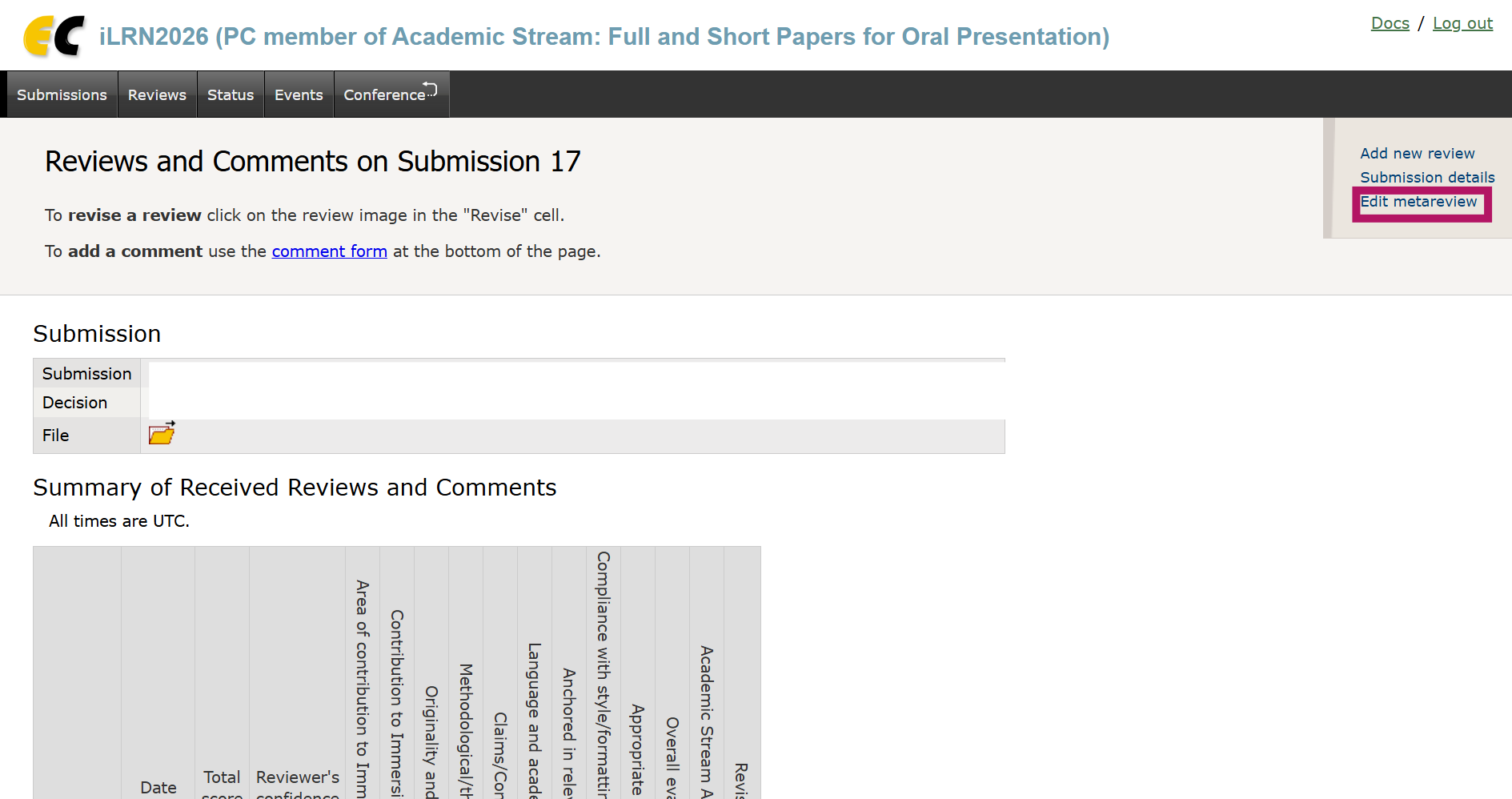
When you are on the review overview page of an individual paper, you can then see the reviews that have been created for that paper. You can only access this page if you have created a review for that paper yourself.
To add a meta review, please use the "Edit metareview" link in the top right corner:
Account creation and access issues
EasyChair account creation
If you do not yet have an EasyChair account, please create one following these instructions: https://easychair.org/help/account_creation.
Access to account not possible
If you lost the access to your account, please check out these instructions: https://easychair.org/help/account_lost. iLRN does not host the EasyChair platform and accounts are created in the general EasyChair system and not specifically for conferences. Unfortunately we cannot help you recover a lost account, but the EasyChair helpdesk might.
What to do if I can log in, but do not see my assignments in my account?
Your assignments are connected to the email address (EA) with which you where invited to be a reviewer (PC member) (email address X). Additional emails related to your role as reviewer (e.g., paper assignment information, review reminders) will also be sent to email address X.
If you are logging in with an EasyChair account but cannot see the assignments in your account, please check which email address(es) the logged in account is connected to (email address X, or a different one, email address Y). These are possible scenarios in which you might not see the assignments (immediately) and potential solutions:
1) You are logging into an account that is associated with email address X but do not see the assignments:
--> Please check if you need to change your role to access the reviews (see https://codex.immersivelrn.org/books/instructions-for-reviewers/page/switching-between-tracks-and-roles). Otherwise, please contact the iLRN EasyChair support team.
2) You are logging into another account that is only connected to email address Y, but you know that you also have an account with email address X:
--> Try logging in with the other account (email address X) and check if you can see the assignments. If not, check point 1).
--> You might consider merging your accounts (see https://easychair.org/help/account_merge)
3) You are logging into another account that is only connected to email address Y and you do not have an account that is connected to email address X:
--> Please consider adding email address X as an alternative email address in your account (see https://easychair.org/help/email_addresses), which should make the assignments of email address X available to the existing account.
--> If you do not want to add email address X as an alternative email address in your existing account, please contact the iLRN EasyChair support and provide the email address of your existing account so the invitation can be updated.
iLRN Conference - Review instructions
Reviews for Academic Stream - Full & Short Papers (Oral Presentation)
Thank you for supporting iLRN’s peer review process. Your careful and ethical evaluation ensures a high standard of research in immersive learning. Please review each submission fairly, confidentially, and professionally, using the criteria provided in the review form while following established international ethical guidelines listed below. The review form is embedded in EasyChair (have a look at this page to see how to add your review).
Paper Type
Please consider the paper type when reviewing. You can find more information on the Academic Stream on this website: https://www.immersivelrn.org/ilrn2026/academic-stream/
Full paper
- 12-15 pages, incl. references
- Springer LNCS template
- for oral presentation
Comprehensive reports of research, development, and application of immersive learning and technologies. Oral presentations might include live recording and global distribution. Online presentations will include publication and distribution of a pre-recorded video.
Short paper
- 8-11 pages, incl. references
- Springer LNCS template
- for oral presentation
Concise reports or preliminary findings of ongoing research on immersive learning/technologies. Oral presentations might include live recording and global distribution. Online presentations will include publication and distribution of a pre-recorded video.
What to Evaluate
In the EasyChair form, please provide ratings on:
-
Contribution to Immersive Learning Research
How much does the submission contribute to research on learning, instruction, teaching or education with immersive technologies? Please keep in mind that the scope of the conference includes research on learning (education/teaching/training/instruction/...) WITH immersive technology (VR/AR/XR/MR/games/360°...), so both components should be clearly included in the submission. Please also check if the submission fits well to the topic that it was submitted to. Otherwise please suggest a better fitting topic (https://www.immersivelrn.org/ilrn2026/call-for-papers/#program-tracks). Justify your review in the field "Comments for the Authors" below. -
Originality and innovation
How original and innovative is this contribution? How novel and unique are the proposed approach, methods, or ideas? Justify your review by providing constructive feedback to the authors to improve their contribution in the field "Comments for the Authors" below. -
Methodological or theoretical rigor
Depending on the type of contribution (empirical or theoretical): How sound is the research methodology or theoretical contribution of this submission? For empirical work: are the experimental design, data collection, and analysis appropriate and well-executed? For theoretical work: are theoretical conclusions logically structured and coherent? Justify your review by providing constructive feedback to the proposal submitters to improve their contribution in the field "Comments for the Authors" below. -
Validity and significance of claims and conclusions
How valid, significant and appropriate are the claims and/or conclusion the authors make? Do they interpret and discuss the implications of their empirical results/theoretical conclusions and (if applicable) the limitations of their work? Justify your review by providing constructive feedback to the authors to improve their contribution in the field "Comments for the Authors" below. -
Quality of writing and academic style
Is the text error free (spelling, syntax, grammar)? Is the text comprehensible to the academic community? Justify your review by providing constructive feedback to the authors to improve their contribution in the field "Comments for the Authors" below. -
Anchoring in relevant and current literature
How well is the paper anchored in relevant immersive learning research literature? Does it provide appropriate citation of related work in the field? Justify your review by providing constructive feedback to the authors to improve their contribution in the field "Comments for the Authors" below. -
Compliance with Springer LNCS style/formatting and referencing guidelines, including use of the respective template
Does the paper comply with the Springer LNCS template and guidelines (https://www.springer.com/gp/computer-science/lncs/conference-proceedings-guidelines/)? Justify your review by providing constructive feedback to the authors to improve their contribution in the field "Comments for the Authors" below. -
If helpful, recommend a more appropriate paper category to support the authors.
Which category would be most appropriate for this paper? Would you recommend the author/s to submit a revised version of the paper to another category? The author/s will be required to revise their paper as necessary to comply with the relevant page limits, and the paper will be reviewed again. Optional: If you want, you can add explanations in the text box. - Overall Evaluation
Please provide the overall evaluation for the submission. Should it be accepted for publication in the conference proceedings and presentation at iLRN2025? For all categories, revisions of papers based on the reviewers' comments should be made. Justify your review by providing constructive feedback to the authors to improve their contribution in the field "Comments for the Authors" below.
Constructive, Ethical & Objective Review
iLRN adheres to recognized peer-review ethics. Reviewers are expected to follow:
- COPE Ethical Guidelines for Peer Reviewers https://publicationethics.org/resources/guidelines-new/cope-ethical-guidelines-peer-reviewers
- iLRN Publications Ethics & Malpractice Statement (Reviewers’ Responsibilities) https://www.immersivelrn.org/about/publications-ethics-and-malpractice-statement/
- Springer Nature Reviewer Guidelines https://www.springer.com/gp/editorial-policies/peer-review-policy-process
Your comments to authors should:
-
Explain and justify all ratings
-
Identify strengths and weaknesses
-
Offer specific, actionable suggestions
-
Use a respectful, unbiased, and professional tone
--> Do not include personal judgments or assumptions about author identity, background, location, or intent.
--> Maintain confidentiality - do not share, store externally, or reuse content.
--> Do not upload manuscripts into generative AI tools, per COPE and Springer Nature policies.
Evidence-Based Evaluation
For empirical contributions:
-
Clear research questions and rationale
-
Appropriate methodology and execution
-
Transparent reporting of results, limitations, and implications
For theoretical/conceptual contributions:
-
Logical and coherent argumentation
-
Grounding in recognized scholarly literature
-
Clear advancement of conceptual understanding in the field
Evaluate only what is presented in the manuscript.
Literature & Research Integrity
Assess whether:
-
Prior work in immersive learning research (i.e. prior ILRN conference proceedings) is properly cited
-
The contribution is clearly contextualized within the field
-
Citation practices meet academic integrity norms
If you suspect plagiarism, fabricated data, ethical issues or unreported AI use:
→ Report concerns via Confidential feedback to the program committee only.
Overall Recommendation
When rating acceptance suitability:
-
Consider both the importance of the contribution and the feasibility of revisions
-
Ensure alignment between ratings, recommendation, and review narrative
-
Even when recommending rejection, include constructive feedback to help the authors improve
Reviewer Confidence & Confidential Notes
- Indicate your true level of expertise in the confidence field
-
Use confidential notes only for communication with Program Committee Chairs (not to authors)
Award Nominations
Nominate a paper only if it demonstrates:
-
Outstanding rigor, originality, clarity, and impact
-
Clear potential to advance immersive learning research
Thank You!
Your thoughtful review contributes to:
-
Excellence in scholarly publication
-
A fair and supportive academic review culture
-
Growth and advancement of the immersive learning community
For any questions related to ethics or review standards, please reach out to the iLRN2026 Program Chairs or the iLRN Scientific Quality Assurance Team.
Reviews for Academic Stream - Extended Abstracts (Poster Presentation)
Thank you for supporting iLRN’s peer review process. Your careful and ethical evaluation ensures a high standard of research in immersive learning. Please review each submission fairly, confidentially, and professionally, using the criteria provided in the review form while following established international ethical guidelines listed below. The review form is embedded in EasyChair (have a look at this page to see how to add your review).
Paper Type
Please consider the paper type when reviewing. You can find more information on the Academic Stream on this website: https://www.immersivelrn.org/ilrn2026/academic-stream/
Extended abstract
- 4-7 pages, incl. references
- iLRN Conference Proceedings template
- for poster presentation
This includes but is not limited to submissions of work that is still in progress, describing early-stage research with theoretical background, methodology, and, if applicable, first data collections and a description of next steps, or completed work, condensed research concepts that may be read and understood within an hour. All poster presentations will also include the publication and distribution of a pre-recorded video through the iLRN YouTube channel.
Extended Abstracts can thus be at an early stage or a work in progress. Please consider this in your review.
What to Evaluate
In the EasyChair form, please provide ratings on:
- Potential Contribution to Immersive Learning Research
How much does the submission (potentially) contribute to research on learning, instruction, teaching or education with immersive technologies? Please keep in mind that the scope of the conference includes research on learning (education/teaching/training/instruction/...) WITH immersive technology (VR/AR/XR/MR/games/360°...), so both components should be clearly included in the submission. Please also check if the submission fits well to the topic that it was submitted to. Otherwise please suggest a better fitting topic (https://www.immersivelrn.org/ilrn2026/call-for-papers/#program-tracks). Justify your review in the field "Comments for the Authors" below. - Originality and innovation
How original and innovative is this contribution? How novel and unique are the proposed approach, methods, or ideas? Justify your review by providing constructive feedback to the authors to improve their contribution in the field "Comments for the Authors" below. - Proposed Methodological/theoretical design
When evaluating the project at its current phase of development, how comprehensive and robust is the proposed methodological or theoretical design of this submission, whether it's an initial concept or a fully realized study? For empirical research, consider if the experimental design, data collection methods, and analysis plans are thoughtfully constructed and feasibly actionable, showing a deep grasp of the research challenge. For theoretical research, examine whether the framework or conclusions are solidly grounded, logically coherent, and poised for a meaningful contribution to the field. Justify your review by providing constructive feedback to the proposal submitters to improve their contribution in the field "Comments for the Authors" below. - Conclusions, Limitations, and/or Expected Outcomes
Assessing the current development stage of the project, how well-defined and promising are the conclusions and recommendations or next steps and future directions as outlined by the authors, whether it's an initial concept or a fully realized study? Evaluate whether the authors have effectively communicated the potential advancements and broader implications stemming from their initial empirical findings or theoretical developments, while also acknowledging and planning for any limitations. Justify your review by providing constructive feedback to the proposal submitters to improve their contribution in the field "Comments for the Authors" below. - Quality of writing and academic style
Is the text error free (spelling, syntax, grammar)? Is the text comprehensible to the academic community? Justify your review by providing constructive feedback to the authors to improve their contribution in the field "Comments for the Authors" below. - Anchoring in relevant and current literature
How well is the paper anchored in relevant immersive learning research literature? Does it provide appropriate citation of related work in the field? Justify your review by providing constructive feedback to the authors to improve their contribution in the field "Comments for the Authors" below. - Compliance with iLRN Proceedings style/formatting and referencing guidelines, including use of the respective template
Does the paper comply with the iLRN template and guidelines (https://publications.immersivelrn.org/index.php/academic/templates)? Justify your review by providing constructive feedback to the authors to improve their contribution in the field "Comments for the Authors" below. - If helpful, recommend a more appropriate paper category to support the authors.
Which category would be most appropriate for this paper? Would you recommend the author/s to submit a revised version of the paper to another category? The author/s will be required to revise their paper as necessary to comply with the relevant page limits, and the paper will be reviewed again. Optional: If you want, you can add explanations in the text box. - Overall Evaluation
Please provide the overall evaluation for the submission. Should it be accepted for publication in the conference proceedings and presentation at iLRN2025? For all categories, revisions of papers based on the reviewers' comments should be made. Justify your review by providing constructive feedback to the authors to improve their contribution in the field "Comments for the Authors" below.
Constructive, Ethical & Objective Review
iLRN adheres to recognized peer-review ethics. Reviewers are expected to follow:
- COPE Ethical Guidelines for Peer Reviewers https://publicationethics.org/resources/guidelines-new/cope-ethical-guidelines-peer-reviewers
- iLRN Publications Ethics & Malpractice Statement (Reviewers’ Responsibilities) https://www.immersivelrn.org/about/publications-ethics-and-malpractice-statement/
- Springer Nature Reviewer Guidelines https://www.springer.com/gp/editorial-policies/peer-review-policy-process
Your comments to authors should:
-
Explain and justify all ratings
-
Identify strengths and weaknesses
-
Offer specific, actionable suggestions
-
Use a respectful, unbiased, and professional tone
--> Do not include personal judgments or assumptions about author identity, background, location, or intent.
--> Maintain confidentiality - do not share, store externally, or reuse content.
--> Do not upload manuscripts into generative AI tools, per COPE and Springer Nature policies.
Evidence-Based Evaluation
For empirical contributions:
-
Clear research questions and rationale
-
Appropriate methodology and execution
-
Transparent reporting of results, limitations, and implications
For theoretical/conceptual contributions:
-
Logical and coherent argumentation
-
Grounding in recognized scholarly literature
-
Clear advancement of conceptual understanding in the field
Evaluate only what is presented in the manuscript.
Literature & Research Integrity
Assess whether:
-
Prior work in immersive learning research (i.e. prior ILRN conference proceedings) is properly cited
-
The contribution is clearly contextualized within the field
-
Citation practices meet academic integrity norms
If you suspect plagiarism, fabricated data, or ethical issues:
→ Report concerns via Confidential feedback to the program committee only.
Overall Recommendation
When rating acceptance suitability:
-
Consider both the importance of the contribution and the feasibility of revisions
-
Ensure alignment between ratings, recommendation, and review narrative
-
Even when recommending rejection, include constructive feedback to help the authors improve
Reviewer Confidence & Confidential Notes
- Indicate your true level of expertise in the confidence field
-
Use confidential notes only for communication with Program Committee Chairs (not to authors)
Award Nominations
Nominate a paper only if it demonstrates:
-
Outstanding rigor, originality, clarity, and impact
-
Clear potential to advance immersive learning research
Thank You!
Your thoughtful review contributes to:
-
Excellence in scholarly publication
-
A fair and supportive academic review culture
-
Growth and advancement of the immersive learning community
For any questions related to ethics or review standards, please reach out to the iLRN2026 Program Chairs or the iLRN Scientific Quality Assurance Team.
Reviews for Academic Stream - Doctoral Colloquium Paper (Oral Presentation in DC session)
Thank you for supporting iLRN’s peer review process. Your careful and ethical evaluation ensures a high standard of research in immersive learning. Please review each submission fairly, confidentially, and professionally, using the criteria provided in the review form while following established international ethical guidelines listed below. The review form is embedded in EasyChair (have a look at this page to see how to add your review).
Paper Type
Please consider the paper type when reviewing. You can find more information on the Academic Stream on this website: https://www.immersivelrn.org/ilrn2026/academic-stream/
Doctoral Colloquium
- 4-7 pages, incl. references
- iLRN Conference Proceedings template
- for oral presentation in the DC session
Both doctoral level as well as master’s by research students/candidates are eligible to submit to the doctoral colloquium (DC). The DC will be held as a session in addition to the regular paper sessions, with students presenting their research to each other (in English). You can find more information on the Doctoral Colloquium here: https://www.immersivelrn.org/ilrn2026/doctoral-colloquium-dc/
Doctoral Colloquium submissions are thus contributions by (Doctoral) Students, usually about their doctoral project or a specific study from it. Please consider this in your review.
What to Evaluate
In the EasyChair form, please provide ratings on:
- Potential Contribution to Immersive Learning Research
How much does the submission (potentially) contribute to research on learning, instruction, teaching or education with immersive technologies? Please keep in mind that the scope of the conference includes research on learning (education/teaching/training/instruction/...) WITH immersive technology (VR/AR/XR/MR/games/360°...), so both components should be clearly included in the submission. Please also check if the submission fits well to the topic that it was submitted to. Otherwise please suggest a better fitting topic (https://www.immersivelrn.org/ilrn2026/call-for-papers/#program-tracks). Justify your review in the field "Comments for the Authors" below. - Originality and innovation
How original and innovative is this contribution? How novel and unique are the proposed approach, methods, or ideas? Justify your review by providing constructive feedback to the authors to improve their contribution in the field "Comments for the Authors" below. - Proposed Methodological/theoretical design
When evaluating the project at its current phase of development, how comprehensive and robust is the proposed methodological or theoretical design of this submission, whether it's an initial concept or a fully realized study? For empirical research, consider if the experimental design, data collection methods, and analysis plans are thoughtfully constructed and feasibly actionable, showing a deep grasp of the research challenge. For theoretical research, examine whether the framework or conclusions are solidly grounded, logically coherent, and poised for a meaningful contribution to the field. Justify your review by providing constructive feedback to the proposal submitters to improve their contribution in the field "Comments for the Authors" below. - Conclusions, Limitations, and/or Expected Outcomes
Assessing the current development stage of the project, how well-defined and promising are the conclusions and recommendations or next steps and future directions as outlined by the authors, whether it's an initial concept or a fully realized study? Evaluate whether the authors have effectively communicated the potential advancements and broader implications stemming from their initial empirical findings or theoretical developments, while also acknowledging and planning for any limitations. Justify your review by providing constructive feedback to the proposal submitters to improve their contribution in the field "Comments for the Authors" below. - Quality of writing and academic style
Is the text error free (spelling, syntax, grammar)? Is the text comprehensible to the academic community? Justify your review by providing constructive feedback to the authors to improve their contribution in the field "Comments for the Authors" below. - Anchoring in relevant and current literature
How well is the paper anchored in relevant immersive learning research literature? Does it provide appropriate citation of related work in the field? Justify your review by providing constructive feedback to the authors to improve their contribution in the field "Comments for the Authors" below. - Compliance with iLRN Proceedings style/formatting and referencing guidelines, including use of the respective template
Does the paper comply with the iLRN template and guidelines (https://publications.immersivelrn.org/index.php/academic/templates)? Justify your review by providing constructive feedback to the authors to improve their contribution in the field "Comments for the Authors" below. - If helpful, recommend a more appropriate paper category to support the authors.
Which category would be most appropriate for this paper? Would you recommend the author/s to submit a revised version of the paper to another category? The author/s will be required to revise their paper as necessary to comply with the relevant page limits, and the paper will be reviewed again. Optional: If you want, you can add explanations in the text box. - Overall Evaluation
Please provide the overall evaluation for the submission. Should it be accepted for publication in the conference proceedings and presentation at iLRN2025? For all categories, revisions of papers based on the reviewers' comments should be made. Justify your review by providing constructive feedback to the authors to improve their contribution in the field "Comments for the Authors" below.
Constructive, Ethical & Objective Review
iLRN adheres to recognized peer-review ethics. Reviewers are expected to follow:
- COPE Ethical Guidelines for Peer Reviewers https://publicationethics.org/resources/guidelines-new/cope-ethical-guidelines-peer-reviewers
- iLRN Publications Ethics & Malpractice Statement (Reviewers’ Responsibilities) https://www.immersivelrn.org/about/publications-ethics-and-malpractice-statement/
- Springer Nature Reviewer Guidelines https://www.springer.com/gp/editorial-policies/peer-review-policy-process
Your comments to authors should:
-
Explain and justify all ratings
-
Identify strengths and weaknesses
-
Offer specific, actionable suggestions
-
Use a respectful, unbiased, and professional tone
--> Do not include personal judgments or assumptions about author identity, background, location, or intent.
--> Maintain confidentiality - do not share, store externally, or reuse content.
--> Do not upload manuscripts into generative AI tools, per COPE and Springer Nature policies.
Evidence-Based Evaluation
For empirical contributions:
-
Clear research questions and rationale
-
Appropriate methodology and execution
-
Transparent reporting of results, limitations, and implications
For theoretical/conceptual contributions:
-
Logical and coherent argumentation
-
Grounding in recognized scholarly literature
-
Clear advancement of conceptual understanding in the field
Evaluate only what is presented in the manuscript.
Literature & Research Integrity
Assess whether:
-
Prior work in immersive learning research (i.e. prior ILRN conference proceedings) is properly cited
-
The contribution is clearly contextualized within the field
-
Citation practices meet academic integrity norms
If you suspect plagiarism, fabricated data, or ethical issues:
→ Report concerns via Confidential feedback to the program committee only.
Overall Recommendation
When rating acceptance suitability:
-
Consider both the importance of the contribution and the feasibility of revisions
-
Ensure alignment between ratings, recommendation, and review narrative
-
Even when recommending rejection, include constructive feedback to help the authors improve
Reviewer Confidence & Confidential Notes
- Indicate your true level of expertise in the confidence field
-
Use confidential notes only for communication with Program Committee Chairs (not to authors)
Award Nominations
Nominate a paper only if it demonstrates:
-
Outstanding rigor, originality, clarity, and impact
-
Clear potential to advance immersive learning research
Thank You!
Your thoughtful review contributes to:
-
Excellence in scholarly publication
-
A fair and supportive academic review culture
-
Growth and advancement of the immersive learning community
For any questions related to ethics or review standards, please reach out to the iLRN2026 Program Chairs or the iLRN Scientific Quality Assurance Team.
iLEAD 2026 Conference Review Criteria (Immersive Learning Education, Arts & Design-Focused)
Established: January 2026
Last Updated: 1/14/2026
Purpose
This page defines the review criteria and reviewer guidance used for evaluating submissions to the iLEAD (Immersive Learning Education, Arts, and Design) Stream at the iLEAD 2026 Conference.
The criteria are published to support transparency, consistency, and shared understanding across contributors, reviewers, and program leadership.
These criteria serve two functions:
This document functions as a versioned procedural standard within the iLEAD governance framework. Updates or revisions are documented and stewarded through the iLEAD Program Chairs in consultation with the General Chairs and the iLRN Scientific Quality Assurance process.
Scope
These review criteria apply to all iLEAD 2026 submission categories, unless otherwise noted in specific calls or track guidance.
Where appropriate, submission formats (e.g., workshops, demonstrations, panels) may include additional contextual guidance, but such guidance does not replace or override the core criteria defined here.
iLRN iLEAD Review Criteria
The criteria below are applied holistically. Reviewers are asked to consider submissions in relation to their stated purpose, context, and intended contribution.
1. Relevance to iLEAD and the 2026 Conference Theme
- Alignment with immersive learning as a field of research, design, practice, or application
- Relevance to the 2026 conference theme and/or the mission of iLEAD
- Clarity of intended audience and contribution
2. Contribution to Practice and Community Relevance
- Usefulness to educators, designers, trainers, or practitioners
- Clear articulation of actionable insights, tools, or transferable lessons
- Engagement with real-world challenges and opportunities
3. Quality of Design, Method, or Practice
- Soundness of learning design, development process, or implementation approach
- Appropriateness of methods, tools, or platforms used
- Evidence of thoughtful implementation or inquiry
4. Innovation and Creativity
- Novelty of approach or application
- Creative or insightful use of immersive technologies
- Introduction of fresh perspectives, even when exploratory or early stage
5. Clarity, Organization, and Communication
- Clarity and coherence of writing or presentation
- Logical organization and completeness
- Accessibility to the intended audience
6. Practical Conclusions and Takeaways
- Clear articulation of lessons learned or recommendations
- Substantiation of conclusions through experience or design rationale
- Value of takeaways for other practitioners
7. Compliance with style/formatting and referencing guidelines.
- Does the paper comply with the iLRN template and guidelines?
Additional Considerations
Depending on submission type, reviewers may also consider:
- Ethical considerations and responsible practice
- Inclusivity, accessibility, and cultural awareness
- Transparency of limitations and future directions
These considerations are not scored independently but inform overall judgment.
Reviewer Guidance and Ethics
Reviewers are expected to contribute to a supportive, constructive, and professional review environment.
Expectations
- Provide actionable, specific feedback that supports author development
- Avoid personal judgments or assumptions about author integrity, background, or intent
- Maintain strict confidentiality of submitted materials
Ethics and Integrity
- Do not upload manuscripts to generative AI tools
- If concerns arise regarding plagiarism, fabricated data, ethical issues, or unreported AI use, report them via Confidential Comments to the Program Chairs only.
Reviewers are expected to adhere to:
- COPE Ethical Guidelines for Peer Reviewers https://publicationethics.org/resources/guidelines-new/cope-ethical-guidelines-peer-reviewers
- iLRN Publications Ethics & Malpractice Statement https://www.immersivelrn.org/about/publications-ethics-and-malpractice-statement/
- Submissions are reviewed using EasyChair with these criteria as a shared framework and review form (this page provides information on how to add a review)
- Reviewers should indicate their confidence level accurately
- Final program decisions are made by the iLEAD Program Chairs in consultation with Track Chairs and the General Chairs
- Acceptance decisions reflect both submission quality and overall program balance
- Revisions based on reviewer feedback are expected for all accepted submissions
Award Nominations
Submissions may be nominated for awards when they demonstrate:
- Outstanding originality, clarity, and impact in practice or design
- Clear value to the iLEAD community
- Potential to meaningfully advance immersive learning education or design
iLEAD Book Series
Selected iLEAD submissions will be invited to contribute a chapter to the iLEAD Book Series.
- iLRN2026 Call for Submissions
- iLEAD 2026 Submission Information
- Recorded iLEAD Webinar (November 25, 2025) – Review Criteria Overview
Versioning and Revision
This page represents the current review criteria for the iLEAD 2026 Conference. Prior versions, revisions, or post-conference reflections may be archived to support transparency and institutional memory.
Editorial Note
The iLEAD review criteria are intended to support fairness, transparency, and constructive evaluation. They are reviewed periodically to ensure alignment with evolving practices, community feedback, and the broader goals of the iLEAD Innovation Garden.
If you have any questions, feel free to contact the iLRN2026 iLEAD Program Chair Team (ilrn2026.ileadprogram@immersivelrn.org).
Industry Product Demonstrations Policy
iLEAD Stream — Industry Product Demonstrations Policy
Summary.
LEAD supports reflective, practice-based contributions across immersive learning in Education, Arts, and Design. Industry product demonstrations are acceptable when they are framed as educational, artistic, or design practice—prioritizing insight, reflection, and dialogue over promotion.
Purpose and Scope
The iLEAD (Immersive Learning Education, Arts, and Design) stream explicitly allows industry-facing product demonstrations when they are framed as reflective, design-informed, and practice-oriented contributions, rather than as promotional showcases.
This page clarifies the intent, boundaries, and review criteria for iLEAD submissions that involve commercial or proprietary products, and is intended for:
-
Prospective iLEAD contributors
-
iLEAD reviewers
-
Program Chairs and Organizing Committee members
Opinion: iLEAD is strongest when it acts as a structured bridge between research, practice, and industry—not when it mimics a trade show. This policy is designed to protect that distinction while still welcoming industry participation.
iLRN encodes Education, Arts, and Design as practice domains, seeking Industry participation while remaining legally sound, reviewer-friendly, and non-promotional. iLEAD asks our industry partners to maintain BOTH the legal and perceived boundaries between for-profit pursuit and the collective pursuit of our non-profit mission.
Immersive Learning industry demonstrations in perspective
The iLEAD (Immersive Learning, Education, Arts, and Design) stream is explicitly practice-oriented. It exists to surface, examine, and advance how immersive learning is used, expressed, and built in the world.
Accordingly, iLEAD welcomes contributions grounded in three complementary areas of immersive learning practice:
Education
Educators, trainers, and facilitators using immersive learning experiences with learners or trainees. Contributions may focus on instructional intent, learning contexts, facilitation strategies, learner response, institutional constraints, and practical outcomes across formal, informal, and workplace settings.
Arts
Artists and creative practitioners using immersive media to experiment, express, and provoke—creating experiences that hook attention, motivate engagement, inspire reflection, and evoke emotion, thought, or action. Artistic contributions are evaluated on clarity of intent, expressive coherence, and reflective insight, not on instructional assessment alone.
Design
Designers and developers crafting immersive learning experiences with attention to interaction design, experience architecture, pedagogy, ethics, accessibility, and quality. Design-focused contributions emphasize process, trade-offs, constraints, and lessons learned rather than finished products alone.
Implications for Industry and Product Demonstrations
Within this practice-oriented framing, industry product demonstrations may be appropriate in iLEAD when the product serves as a vehicle for examining educational practice, artistic expression, or design decision-making.
A commercial or proprietary system may therefore be presented when it is:
-
Used as a case of educational practice, illuminating how immersive learning is enacted with real learners or institutions;
-
Treated as an artistic medium, enabling discussion of expressive intent, affective impact, or cultural meaning; or
-
Examined as a design artifact, foregrounding design rationale, constraints, trade-offs, and implementation insight.
The determining factor is not whether a product is commercial, but whether the session advances understanding of immersive learning practice across education, arts, or design.
Sessions that function primarily as marketing, promotion, or sales—rather than reflective practice—remain outside the scope of iLEAD. Industry representatives should refrain from direct sales pitches or promotions in any iLEAD presentation, but may discuss such topics in private conversations.
Relationship to the iLRN Yellow Pages
Industry, design, and artistic product demonstrations accepted into the iLEAD stream may be invited to participate in the iLRN Yellow Pages, a publicly accessible directory documenting immersive learning organizations, platforms, programs, and individual expertise.
Inclusion in the iLRN Yellow Pages:
The iLRN Yellow Pages function as credentialed visibility, not advertising. Their legitimacy derives from participation, disclosure, and contextual placement—never from payment or promotion.
- Is optional and requires explicit consent
- Does not constitute endorsement by iLRN
- Reflects a willingness to engage transparently with the iLRN community
- Supports discoverability, scholarly context, and professional connection
Yellow Pages entries are presented as descriptive, structured profiles, not promotional content. Listings may include:
- Declared domain(s) of practice (Education, Arts, Design)
- Use contexts (formal education, informal learning, workforce training, cultural production)
- Prior iLRN engagement (e.g., iLEAD demonstrations, workshops, webinars)
- Public documentation or research-adjacent links
Review and Governance Implications
- Acceptance into iLEAD does not guarantee inclusion in the Yellow Pages
- Yellow Pages listings are curated infrastructure, not benefits of sponsorship
- Reviewers evaluate submissions solely on practice-based merit, independent of any directory listing
This separation preserves:
- Reviewer independence
- Non-profit integrity
- The scholarly credibility of iLEAD and the broader iLRN ecosystem
Codex Metadata
- Applies to: iLEAD Stream
- Audience: Reviewers, Contributors, Program Chairs
- Status: Active Policy Clarification
- Maintained by: iLEAD Program Committee
Closing Reflection: iLRN places practice first, visibility second, and promotion nowhere in the stack.
Codex Metadata
-
Applies to: iLEAD Stream
-
Audience: Reviewers, Contributors, Program Chairs
-
Status: Active Policy Clarification
-
Maintained by: iLEAD Program Committee