# About Building in FrameVR + Advanced Interactions
# FrameVR Technical Capabilities
*iLRN Campus Codex — Engine, interactivity, and 3D asset support*
## Under the Hood: Babylon.js
FrameVR is built on [Babylon.js](https://www.babylonjs.com/), a powerful open-source 3D rendering engine. However, FrameVR abstracts most of Babylon.js’s native functionality behind its own interface. Users work within FrameVR’s sandbox rather than having direct access to the full engine.
Advanced features such as complex physics simulations and custom scripting are not directly accessible within the platform. Teams should work within the Action Editor and supported asset formats to achieve interactivity.
## FrameVR Knowledge Base & Other Info
FrameVR offers many valuable resources for users building on their platform. Here are a few of the options available:
[**Knowledge Base**](https://support.framevr.io/Frame-Knowledge-Base-cfc4bc81aa1442a9a2dd9e995dbaeab0)
[**Blog**](https://learn.framevr.io/blog)
[**Tutorials**](https://learn.framevr.io/tutorials)
[**Help Forum (Discord)**](https://discord.com/invite/5m5hBrV)
[**Developer API**](https://api.framevr.io/doc/automate/)
## Interactivity: The Action Editor
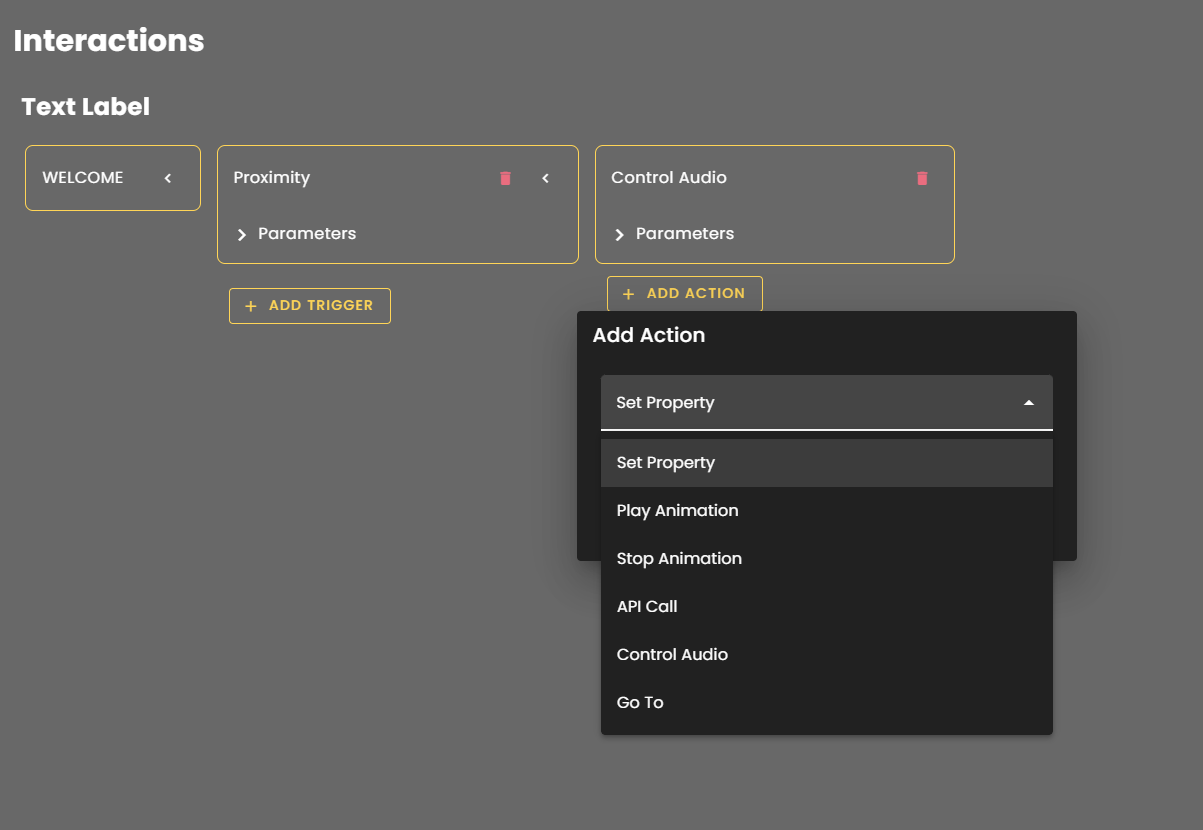
FrameVR’s Action Editor provides a no-code interface for adding interactivity to spaces. While limited compared to full engine access, it supports a meaningful range of triggers and responses:
• **Play Audio —** Trigger ambient sounds, narration, or sound effects on proximity or interaction
• **Animate Models —** Activate animation cycles embedded in uploaded 3D assets
• **Show / Hide Objects —** Toggle visibility of elements based on user actions
• **Open URLs —** Link out to external content, documents, or media
• **Teleport Users —** Move participants to different locations within or between spaces
These tools are well-suited for guided experiences, interactive exhibits, and layered storytelling within a campus environment.
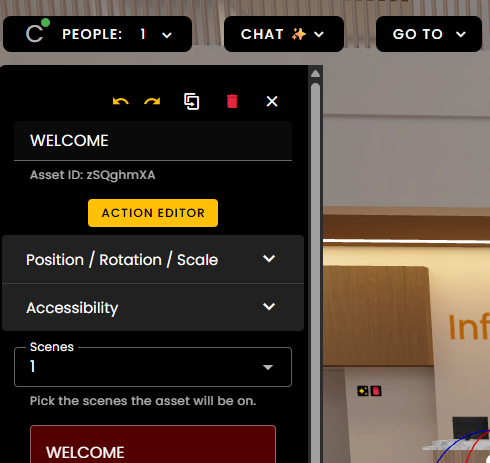
**Access this tool by entering Edit Mode > Click Asset > Open Action Editor > Set Trigger + Action**
[](https://codex.immersivelrn.org/uploads/images/gallery/2026-03/dPtWZdmhqAcTmnxA-actionedit2.png)
[](https://codex.immersivelrn.org/uploads/images/gallery/2026-03/2ShpyN9KTxop2PBg-actionedit1.png)
[](https://codex.immersivelrn.org/uploads/images/gallery/2026-03/P8J0Zr3uBIWt7enP-actionedit3.png)
## 3D Assets: glTF Format
FrameVR supports [glTF (.glb/.gltf)](https://en.wikipedia.org/wiki/GlTF), the widely used open standard for 3D assets. Importantly, glTF files can contain embedded animation cycles, which can then be triggered via the Action Editor — making it possible to bring in animated objects (moving parts, characters, environmental effects) without custom code.
Recommended tools for creating or converting glTF assets:
• **Blender** (free, open-source) — excellent glTF export with full animation support
• **Sketchfab** — browse and download community glTF models, many with embedded animations
• Various online converters for existing 3D models
## Gaussian Splats: Photorealistic Spatial Capture
FrameVR supports Gaussian Splat files (.ply / .splat), a cutting-edge format for representing real-world spaces with photorealistic quality. Gaussian Splats are captured using photogrammetry-adjacent workflows and rendered as volumetric point clouds, producing immersive, high-fidelity representations of physical locations.
This is a significant capability for campus-building — real landmarks, architectural spaces, or culturally significant sites can be captured and placed directly into a FrameVR environment.
Capture tools to explore:
• **Luma AI** — mobile-friendly capture, accessible for most devices
• **Polycam** — supports Gaussian Splat export alongside standard photogrammetry
• **Postshot** — desktop processing for higher-quality splat results
\[DRAFT: Example soon, check back for update! \]
**Note: **A Gaussian Splat of a nearby landmark is being explored as a demonstration asset for the iLRN campus — a model for how regional teams might contribute place-based content to shared virtual spaces.