iLRN Central — Main Hub
iLRN_Central (Agora Welcome Center)
0. Build Governance Rules
Every asset must either:
-
help users understand where they are
-
help users understand where to go
-
help users understand why this space matters
If it does none of these, it should be removed.
1. Frame Overview
Frame Name: iLRN_Central (Agora Welcome Center)
Associated Program Area(s):
- Main Stage
- Orientation / Wayfinding Hub
- Cross-program campus gateway (Academic, iLEAD, Futures, Community)
Primary Purpose:
A lightweight, low-polygon Agora that serves as the central orientation, navigation, and gathering space for iLRN2026. It anchors the entire virtual campus by providing immediate clarity on where to go, what is happening, and how to engage across the conference ecosystem.
- Codex Page URL: https://codex.immersivelrn.org/books/online-hosts-ilrn2026-private/page/ilrn-central-main-hub
-
Page Last Updated: April 15, 2026
- Linked Frames:
- Knowledge Tree Branch Houses (all)
- Student Center
- Thirsty Scholar Debate Hall
- Guided Virtual Adventures HQ
- Special Track / Showcase Frames
Secondary Functions:
- Informal gathering and discussion
- Lightweight event hosting (announcements, transitions)
- Visual index of the field and conference activity
For Target Audiences:
- All attendees (primary)
- Presenters
- Volunteers
- Organizing Committee
- First-time visitors
Operational Mode:
- ☑ Online-only (June 14–15)
- ☑ Hybrid (Online + Athens)
2. Ownership & Stewardship
Frame Owner (Accountable):
Jonathon Richter (CEO/President, iLRN)
Co-Steward(s):
- Virtual Campus Architect & Community Lead
- Technical Lead (Frame VR)
- Volunteer Coordinator (Operations)
Operations and scheduling: Conference Program Chairs
Technical issues: CTO / Tech Lead
Escalation Path:
Greeter/Volunteer → Tech Support Lead → CTO → CEO (if structural)
3. Design & Experience Intent
Experience Goal:
Participants should immediately understand (within seconds) where they are, what pathways exist, and how to enter the intellectual and social life of the conference. The space should feel open, legible, and active—more like a civic forum than a building.
Design Constraints:
- Ultra low-polygon environment (performance-first)
- Minimal textures; repeated modular assets
- Clear sightlines across the entire Agora
- No enclosed or maze-like structures
- Poster-based navigation (not kiosks)
Key Interaction Patterns:
- Arrival / Orientation:
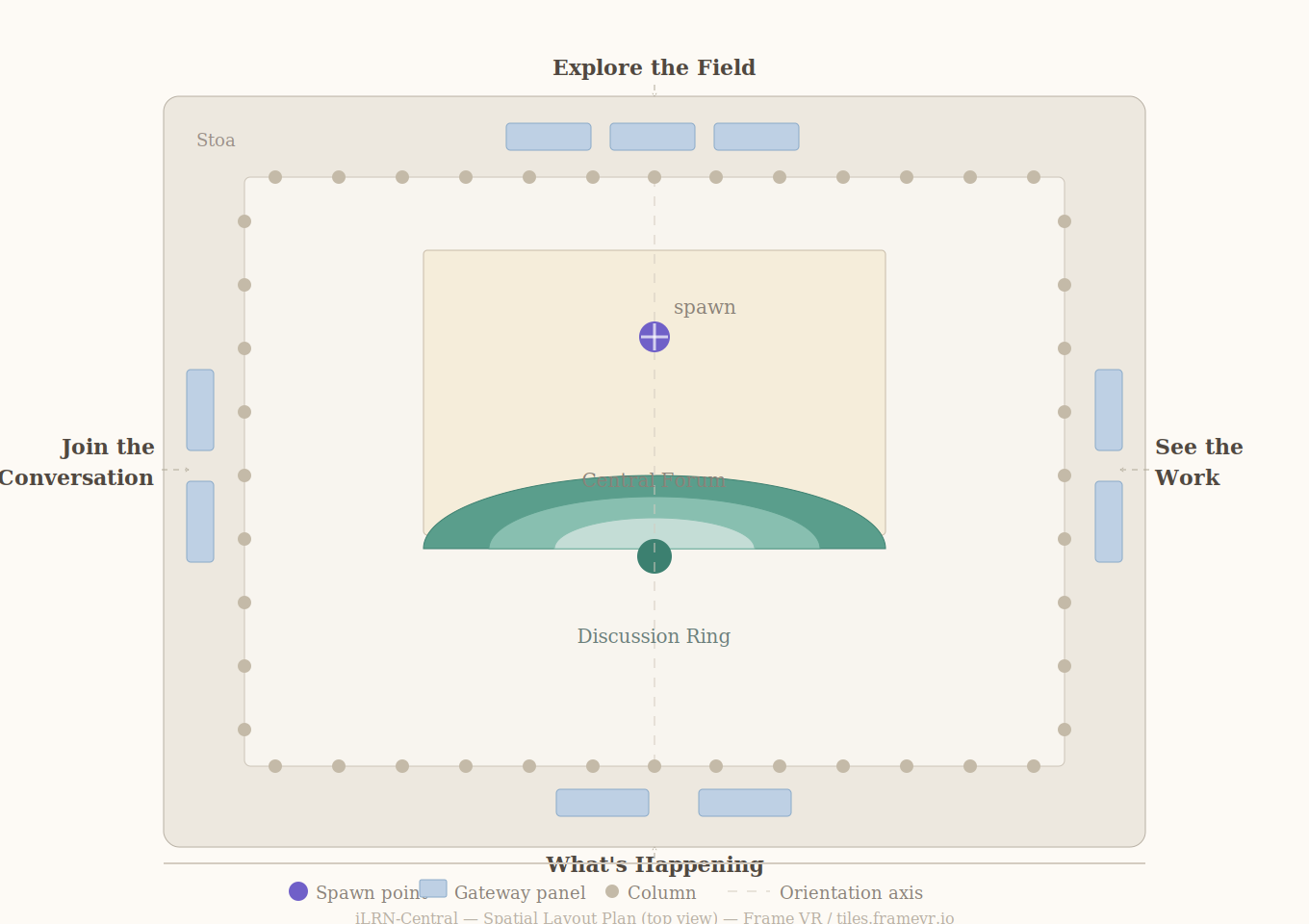
Users spawn at the center axis facing the amphitheater and main stage. An orientation poster kiosk shall be very nearby with wayfinding (e.g. welcome, map, quadrants by color: The four cardinal zones are immediately visible: - Explore the Field (back wall)
- What’s Happening (front)
- Join the Conversation (left)
- See the Work (right)
- Primary Activity:
Users move to one of four walls, each containing eight clickable poster-panels. These act as gateways into the broader ecosystem (Frames, sessions, Codex-linked content). - Central Interaction:
The amphitheater supports live or ambient gathering, with a stage and screen for announcements or featured content. - Exit / Transition:
Users select a poster (gateway) → transition to a target Frame → can return to iLRN_Central within ≤ 2 steps. - GoTo menus have legible links to each Frame across the virtual campus
Athens Reuse or Extension:
Functions as the conceptual “digital Agora” complement to physical gathering spaces in Athens. Can be mirrored through signage, program structure, and session clustering.
Opinion:
This redesign corrects the prior failure mode: overbuilt architecture that obscured purpose. The Agora now behaves as an index, not a destination.
Entry Points:
- Default spawn location (center axis)
- Direct links from schedule (CVENT)
- Guided tours and onboarding flows
Internal Wayfinding Elements:
- Four labeled zones (large-scale text):
- Explore the Field
- What’s Happening
- Join the Conversation
- See the Work
- Eight poster-panels per zone (32 total):
- Each is a clear, clickable gateway
- Central amphitheater (visual anchor)
- Perimeter column rhythm (subtle spatial boundary cue)
Exit Paths:
- Poster → linked Frame
- Return links from all Frames → iLRN_Central
- Guided navigation (optional)
Wayfinding Owner:
Virtual Campus Architect
5. Accessibility & Inclusion Checklist
Accessibility Lead:
(Insert)
Baseline Commitments:
- ☑ Clear signage and readable contrast
- ☑ Audio redundancy (voice + visual cues)
- ☑ Spatial simplicity (single open layout)
- ☑ Alternative participation pathway documented (Codex + Zoom)
Known Constraints or Risks:
- Poster density (32 total) may overwhelm without strong visual hierarchy
- Reliance on spatial navigation may disadvantage first-time XR users
Athens Considerations:
- Align signage language with physical program categories
- Ensure consistency in terminology across modalities
6. Volunteer & Support Roles
|
Role |
Name |
Backup |
Notes |
|
Greeter / Wayfinder |
|
|
First point of contact at spawn |
|
Presentation Moderator |
|
|
For amphitheater use |
|
Tech Support |
|
|
Visible and accessible at all times |
|
Volunteer Float |
|
|
Covers overflow and transitions |
Training Required:
- ☑ Yes (Codex onboarding page)
Shift Coverage Notes:
- Continuous coverage across 48-hour global cycle
- Explicit handoffs between time zones
7. Presentation & Session Operations
Presentation Format(s):
- ☑ Live (announcements only)
- ☑ Pre-recorded (screen playback optional)
- ☑ Mixed
Moderator Responsibilities:
- Speaker readiness
- Timekeeping
- Q&A (if applicable)
- Transition signaling
Speaker Support Assets:
- Backup links (Zoom, YouTube)
- Slide hosting (external)
8. Technical Configuration
Frame URL: (insert)
Capacity: ~100 (Plus Frame recommended)
Backup Space: Secondary Hub Frame (if needed)
Known Failure Modes:
- Overcapacity at spawn
- Audio overlap in amphitheater
- Users not understanding poster interactivity
Contingency Plan:
- Redirect to backup Hub
- Push users to Zoom session links
- Deploy volunteers to guide manually
9. 48-Hour Online Conference Integration
Primary Active Windows:
- Continuous (global participation model)
Linked Events:
- Opening / closing moments
- Transition announcements
- Informal gatherings
Quiet / Reset Periods:
- Scheduled low-activity windows between peak cycles
10. Post-Conference Use
Intended Afterlife:
- ☑ Reusable community space
- ☑ Archive (poster panels updated or repurposed)
Documentation Owner:
Virtual Campus Architect + Codex Steward
HUB-03 iLRN Central — Main Hub
|
Frame Type |
Hub — Primary Gathering Space |
Status |
OPEN |
|
Track / Branch |
iLRN ORG — Campus-Wide |
Capacity |
300 users |
|
FrameVR URL |
http://framevr.io/ilrn-central |
||
|
Notes |
Needs completion via FrameVR. Greek Agora-themed hub for iLRN2026 — intended capacity ~300, serving as social complement to Zoom sessions and the in-person Athens conference. |
||
Purpose Statement — what iLRN Central must do
|
iLRN Central is the front door of the iLRN virtual campus. It is the first place most participants will land, the space that sets the tone for the entire conference, and the orientation layer that makes every other Frame navigable. This location acts as an active commons. Every design decision here must serve three functions simultaneously: orient newcomers, connect experienced participants to what they are looking for, and embody the Open Society theme of iLRN2026. |
1 Ownership & Governance
|
Frame Lead / Owner |
Jonathon Richter |
|
Content Contributors |
all 2026 Frame Team |
|
Technical Steward |
Michael Hamaoka |
|
Accessibility Reviewer |
Sarune Savickaite |
|
Last Updated |
April 04, 2026 |
2 Learning Design Requirements — informed by UDL 3.0 (CAST, 2024)
iLRN Central must operationalize the campus learning design principles at the point of entry. The following requirements are non-optional — they are the learning design layer of the build, not decorative or optional additions.
|
|
Orientation & Scaffolding (Frehlich: guided vs. open learning; novices need maps) |
Criterion / Pass Threshold |
|
A clearly marked 'Start Here' zone exists at the entry point with movement and navigation instructions |
Visitor locates it within 10 sec of entering, without prior knowledge |
|
|
Signage explicitly differentiates pathways for: first-time visitors / returning members / conference presenters |
Three distinct pathway signs or boards present at entry |
|
|
A 'What is iLRN?' explainer board is present — including the mission statement and three network lenses |
Board visible from entry; text legible on mobile screen |
|
|
A campus map or Frame directory is embedded as a board or linked object |
Full campus map (all 24 frames) accessible from Central without leaving the Frame |
|
|
|
Representation — Multiple Ways to Access Content (UDL 3.0, CAST 2024) |
Criterion / Pass Threshold |
|
All navigation signage uses text labels AND visual/spatial cues — not spatial position alone |
No portal or zone identified only by colour or shape |
|
|
A link to the Codex (BookStack) is prominently featured as a text-equivalent layer for all in-world content |
Codex URL linked on at least one board in the entry zone |
|
|
Live event schedule is posted as a board in Central (not only in external calendar systems) |
Current week's schedule visible in-Frame |
|
|
|
Action & Expression — Multiple Ways to Participate (UDL 3.0; Frehlich: transactional learning) |
Criterion / Pass Threshold |
|
At least two asynchronous contribution pathways are available from Central (e.g. forum link, Codex comment) |
Both links confirmed live |
|
|
Quest/scavenger hunt entry point or first clue is embedded in Central (iLRN2026 Greek Agora theme) |
Quest entry confirmed with George / Greek team before launch |
|
|
Discord server link is embedded in Central as a contribution/community pathway |
Discord invite link confirmed live and not expired |
|
|
|
Engagement — Relevance, Autonomy, and Belonging (UDL 3.0; Frehlich: emotional well-being) |
Criterion / Pass Threshold |
|
Greek Agora theming is applied — cultural artifacts, philosophical references, spatial identity elements |
At least 3 distinct Agora-themed elements placed; performance budget not exceeded |
|
|
iLRN2026 conference theme (From Plato's Cave to Open Immersive Societies) is visually present |
Theme text or visual visible from entry zone |
|
|
Social spaces (Haptics Café, Thirsty Scholar) are signposted directly from Central |
Portal or board links to both social spaces |
|
|
A welcoming statement from iLRN leadership is included (text board or video board) |
Statement approved by organising team; video set to NOT autoplay |
3 Design & Build Checklist
every asset must either help users understand where they are, where to go, or why this space matters. If it does none of those, it is a likely candidate for removal
|
|
Layout (Hub Frame — high traffic, open, multi-portal) |
Criterion / Pass Threshold |
|
Open, uncluttered layout at entry — no objects blocking central walking path |
Walk path clear for avatar movement in all directions from spawn point |
|
|
Multiple portals (minimum 4) connecting to key campus zones |
≥ 4 portals: Branch Houses hub, Special Projects, Community Spaces, and Expo |
|
|
Consistent portal visual language used — same portal asset style as all other Frames |
Portal asset matches campus-wide standard |
|
|
Frame environment size is appropriate for 300-user capacity — large, open environment selected |
Not a small meeting room env; auditorium or plaza-scale |
|
|
|
Navigation |
Criterion / Pass Threshold |
|
No dead-end navigation paths — every portal links out; Central links in from all Frames |
Verified by walking test; all portals bidirectional |
|
|
'Go To Menu' configured with named links to all 24 campus Frames |
Frame link list complete and tested |
|
|
Navigation from entry to any Branch House ≤ 2 portal hops |
Routing map confirms ≤ 2 hops to any Frame |
|
|
|
Signage |
Criterion / Pass Threshold |
|
All text legible at default eye level on a mobile screen without zooming |
Phone screen test by reviewer |
|
|
No signage relies on colour alone |
Each colour-coded element has a text or icon label |
|
|
Signage uses consistent font style with rest of campus |
Matches campus-wide signage template |
4 Performance & Asset Budget — 300-user hub
|
iLRN Central has the highest expected concurrent user count on campus (300). Performance budgets should be treated as hard ceilings, not guidelines. Check via Frame Settings → Performance Rating or ?debug=true → Babylon Inspector. |
|
|
Performance Monitor Readings — record actuals in fields below |
Criterion / Pass Threshold |
|
FPS ≥ 40 on reviewer desktop (Chrome/Edge) |
Target 60; below 40 = must fix |
|
|
FPS ≥ 30 on iOS Safari mobile |
iOS Safari is hardest platform; must pass |
|
|
Draw call count ≤ 200 |
Babylon Inspector → Stats; hard ceiling per FrameVR docs |
|
|
Active face/poly count ≤ 130,000 |
Babylon Inspector → Stats; hard ceiling per FrameVR docs |
|
|
Material count ≤ 20 |
Babylon Inspector → Stats; hard ceiling per FrameVR docs |
|
|
Performance Rating not flagged RED in Frame Settings |
Yellow = caution; Red = block launch |
|
|
|
Asset Hygiene — especially critical for high-capacity Hub |
Criterion / Pass Threshold |
|
All images compressed before import (squoosh.app) |
No raw camera/screen captures imported |
|
|
No 3D model from Sketchfab imported without poly-count review |
Flagged models in Assets list reviewed and resolved |
|
|
Unused assets deleted (not just hidden) |
Assets list contains only active assets |
|
|
Greek Agora themed assets are low-poly — confirmed before placement |
Each Agora asset poly-counted before upload |
|
|
|
Media Settings |
Criterion / Pass Threshold |
|
All videos set to NOT autoplay |
Each video asset → autoplay = OFF |
|
|
Webcam/streaming screens disabled unless live event in progress |
Default OFF; enable only during scheduled sessions |
|
|
No Smoke particle effects in use |
Smoke = high GPU cost; zero tolerance in a 300-user hub |
|
|
No excessive animated objects; animations minimised |
Each looping animation adds ongoing GPU load |

|
FPS Desktop |
|
|
FPS iOS Safari |
|
|
Draw Calls |
|
|
Poly Count |
|
|
Materials |
|
|
Perf. Rating |
|
5 Content & Boards Checklist
|
|
Required Boards — iLRN Central |
Criterion / Pass Threshold |
|
'Start Here' orientation board (movement, interaction, navigation instructions) |
Board present at entry spawn point |
|
|
'What is iLRN?' mission statement board (includes 3 network lenses) |
Text matches approved mission statement in this document |
|
|
Campus map / Frame directory (all 24 frames named and linked) |
All 24 Frame names and URLs current |
|
|
Conference schedule board — current week / full conference programme |
Schedule confirmed with programme team; updated weekly during conference |
|
|
iLRN2026 theme board (From Plato's Cave to Open Immersive Societies) |
Design approved by organising team |
|
|
Leadership welcome statement (text or video board; video = no autoplay) |
Content approved; if video, autoplay = OFF |
|
|
Codex link board (BookStack private and/or public pages as appropriate) |
URL live and tested |
|
|
Discord community link board |
Invite link live and not expired |
|
|
Quest / scavenger hunt entry point (Greek Agora theme; first clue or quest intro) |
Content confirmed with George / Greek team |
|
|
Portals to: Branch Houses area / Special Projects / Community Spaces / Expo Halls |
All 4 portal types present and functional |
|
|
|
iLRN2026 Greek Agora Theming Elements |
Criterion / Pass Threshold |
|
At least 3 Agora-themed cultural artifacts placed (columns, amphora, laurel, philosophical text) |
Each asset poly-counted and within budget before placement |
|
|
Philosophical reference to Plato's Cave visible in Central space |
Text or visual element present |
|
|
Quest entry object placed and linked to quest system |
Confirmed live with George / Greek team |
5A iLRN Network Membership Quadrant — Civic Offices
Function within iLRN Central
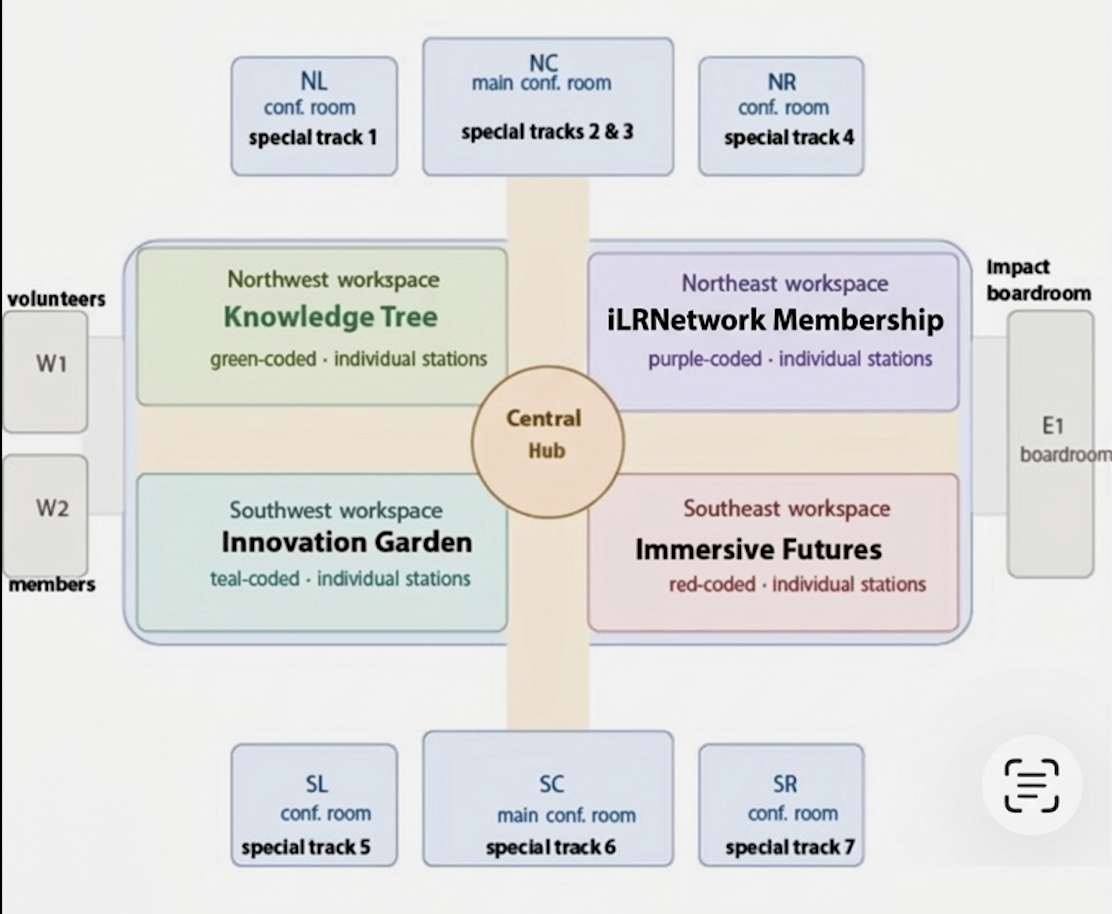
The iLRN Network Membership Quadrant is a participation and intake district within iLRN Central. It replaces the former Circle of Scholars quadrant and serves as the main civic interface for joining, identifying, routing, and contributing within the iLRN network. This quadrant should not read as a decorative conceptual area. It is an operational zone that helps convert visitors into known participants, members, contributors, partners, volunteers, and chapter contacts.
This quadrant must support both:
- conference-period onboarding, especially for attendees entering the professional layer of the campus, and
- year-round network participation, including public visitors, prospective partners, and future contributors.
Its purpose is to give users a clear answer to the question: How do I formally connect to iLRN from here?
Design Requirement
All twelve offices in this quadrant must be immediately understandable as distinct participation pathways. Users should be able to identify the correct office within a few seconds based on plain-language naming, visible signage, and a short one-sentence purpose statement.
This quadrant must not require prior knowledge of iLRN’s organizational structure in order to be usable.
Core Build Logic
Each office in the quadrant should do at least one of the following:
- identify who a person is in relation to the network
- route them to the correct next layer of participation
- capture structured interest for follow-up
- open an ongoing relationship with iLRN
Where possible, forms should be short, role-based, and use branching logic instead of forcing everyone through the same intake sequence.
iLRN-Central Civic Offices Directory
1. Membership Application Office
*Campus Link
https://framevr.io/ilrn-central#office-membership-applications

Primary intake point for people formally joining or identifying themselves within the network. This office should distinguish among conference participants, public visitors, students, educators, researchers, and other participant types so that downstream records and access pathways can be updated accordingly.
LINK: MEMBERSHIP APPLICATION FORM
Outputs: member profile record, access tier clarification, role-based follow-up.
2. Campus Visitor Registry
* Campus Link
https://framevr.io/ilrn-central#office02-campus-visitors
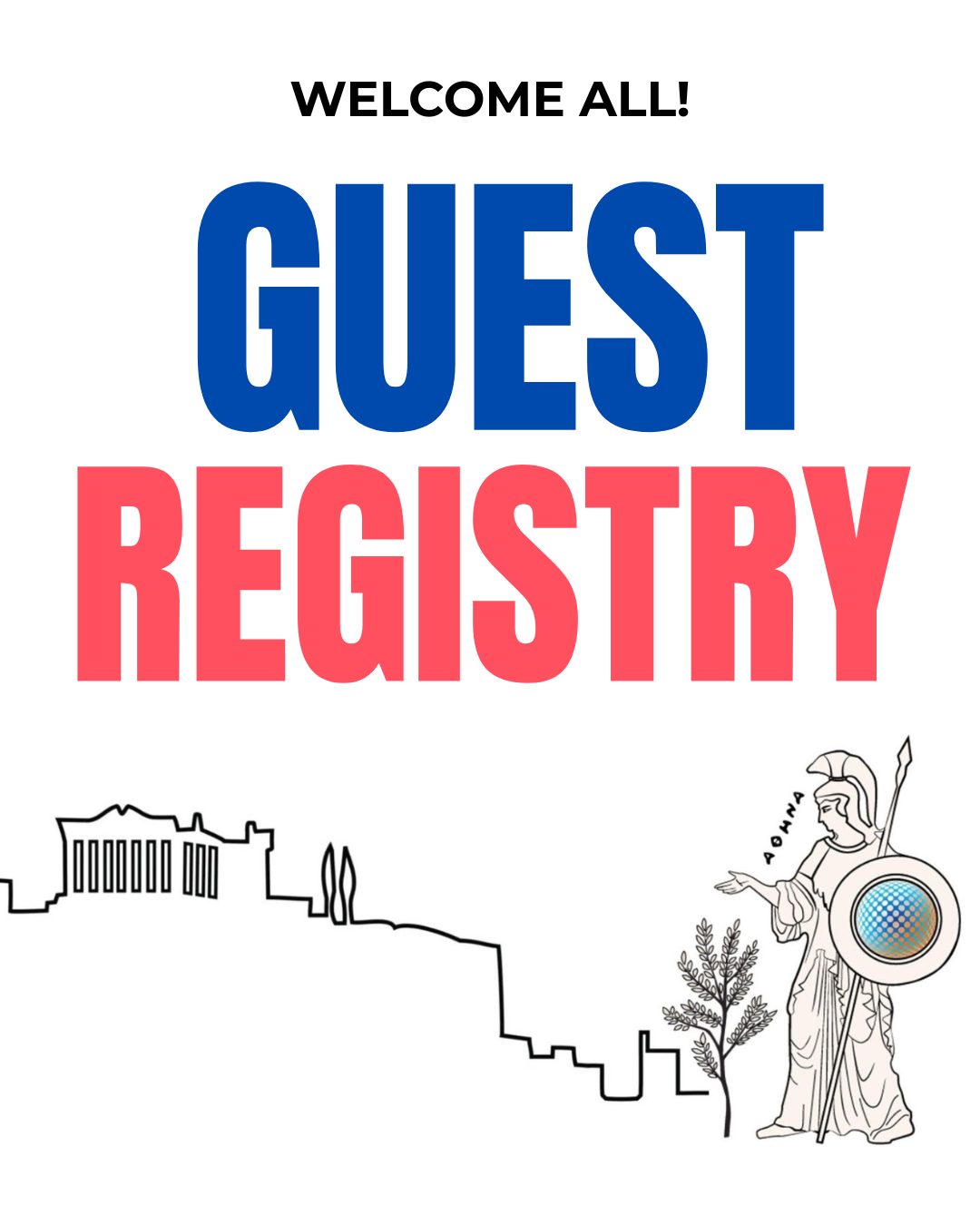
A lightweight visitor sign-in office for people who are exploring the campus but are not yet joining as members. This should function like a guest book with optional identification, allowing iLRN to thank visitors, understand traffic, and create a minimal visitor record.
LINK: CAMPUS VISITOR REGISTRY FORM
Outputs: visitor record, follow-up thank-you, possible later invitation into membership pathways.
3. Newsletter Subscription & Contribution Office
*Campus Link
https://framevr.io/ilrn-central#office-subscribe-and-contribute

Subscription and editorial-interest intake for the newsletter. This office should allow users to subscribe, confirm preferred content streams, and indicate whether they would like to contribute material such as articles, interviews, field reports, or resource recommendations.
LINK: SUBSCRIBE and CONTRIBUTE TO OUR iLRN NEWSLETTER FORM
Outputs: segmented newsletter preferences, contributor interest record, editorial follow-up.
4. Partner Development Inquiry Office
Professional intake point for institutional engagement. This office is for organizations or representatives interested in collaboration, sponsorship, partnership, standards participation, or broader institutional membership.
Outputs: qualified partner lead, partnership inquiry record, routing to leadership or business development follow-up.
5. Volunteer & Contributor Interest Office
Participation intake for people willing to give time, labor, coordination, facilitation, technical support, or domain expertise. This office should make visible the different kinds of service pathways across conference operations, virtual campus support, community activities, and longer-term network work.
Outputs: volunteer record, skill matching data, routing to appropriate teams.
6. Community Channels Connection Office
Routing point for ongoing participation in community spaces. This office helps people identify and opt into the relevant communication and community channels across Discord, Invision Community, special interest groups, and design-based research or topic-specific spaces.
Outputs: channel preference data, targeted outreach capability, stronger community routing.
7. Regional Capacity & Community of Practice Affiliation Office
Geographic and chapter-related intake. This office helps users identify existing regional or national communities of practice and also captures interest from people who may want to help start a new chapter where none exists.
Outputs: chapter match, regional interest record, chapter formation lead if relevant.
8. Codex Contribution Office
Entry point for crossing from reader to contributor within the Codex. This office should explain the Codex as living knowledge infrastructure and provide a pathway for contributing resources, reflections, case material, or structured entries.
Outputs: Codex contributor lead, knowledge contribution intake, orientation to BookStack/Codex use.
9. Standards Initiative Stakeholder Office
Intake point for stakeholders interested in standards and competency work. This includes educators, researchers, institutions, and practitioners who want to participate in standards-related discussions, pilots, frameworks, or allied competency-building efforts.
Outputs: standards stakeholder record, working group prospects, follow-up for standards initiatives.
10. Events & Programming Participation Office
Office for people who want to engage through scheduled activities such as webinars, book clubs, debates, workshops, community sessions, or future event programming. This office captures programming interest apart from general membership.
Outputs: event participation interest record, future programming lists, cohort development.
11. Innovation & Project Incubation Office
Office for people who want to propose, join, or support emerging projects. This may include research collaborations, pilot programs, practice showcases, design experiments, or work connected to the Innovation Garden and related initiatives.
Outputs: project idea intake, collaborator matchmaking, incubation pipeline.
12. Sponsorship & Funding Interest Office
Office for organizations or individuals interested in supporting iLRN financially through sponsorship, funding partnerships, donations, or aligned support mechanisms. This should be framed professionally and distinctly from general partnership inquiries.
Outputs: funding lead, sponsorship inquiry, development follow-up.
Pass Thresholds — Membership Quadrant
Criterion / Pass Threshold
- A clearly labeled entrance or directory for the Network Membership Quadrant is visible from the main hub circulation area
- Quadrant identifier visible without entering a side corridor or secondary chamber
- All 12 civic offices are named in plain language and include a one-sentence descriptor
- No office title depends on insider terminology alone
- At least the first 7 priority offices are live by launch
Membership, Visitor Registry, Newsletter, Partner Development, Volunteer, ___, ___ offices confirmed functional
- Each active office contains a working form or link object
- No dead-end office spaces
- Every office includes a visible “What happens next?” statement
- User can tell whether they will receive follow-up, gain access, or be routed elsewhere
Membership Application Office distinguishes member type or user role
- Branching logic or equivalent field tested
- Visitor Registry remains lighter-weight than membership application
- Visitor pathway takes materially less time to complete
- Partner Development and Sponsorship/Funding offices are clearly differentiated
- Institutional relationship inquiries do not collapse into generic contact capture
- Regional Capacity office links to existing chapter information and chapter formation guide
- Chapter pathway live and tested
Codex Contribution office explains what the Codex is for newcomers
- Explanation readable in-Frame and linked externally if needed
- Standards Initiative office is framed in professional language suitable for external stakeholders
- Reviewed for clarity and tone
All office links are accessible outside the Frame as fallback pathways & reflected on our website
Critical participation does not fail if Frame navigation fails
Wayfinding Requirements for This Quadrant
- The quadrant must be signposted from the main iLRN Central entry area.
- It must be possible to understand the difference between:
- joining the network,
- visiting the campus,
- subscribing to communications,
- volunteering,
- institutional partnership,
- chapter affiliation,
- contributing to the Codex,
- participating in standards work.
- If the twelve-office structure produces clutter, the first layer should be a directory board that routes users into grouped pathways such as:
- Join
- Visit
- Contribute
- Partner
- Organize Regionally
- Build Knowledge
- Support / Fund
Such grouping may be spatial, textual, or both, but the underlying office distinctions should still remain clear.
Accessibility Requirements for This Quadrant
- No office may be identifiable by color alone.
- Every office must have readable text labeling.
- Essential participation pathways must be reachable from a stationary avatar position through boards or linked objects.
- All forms must have a web-accessible fallback link.
- Language should be welcoming and legible to newcomers, not written as internal administrative shorthand.
Operational Notes
This quadrant will only be valuable if each office is tied to an actual response workflow. A live form without clear downstream ownership will produce dead records instead of network activity.
Each office should therefore have:
- a responsible owner,
- a follow-up destination,
- and a defined response expectation.
At minimum, ownership for each office should be tracked in an internal operations table even if that table does not appear in the public-facing version of the hub page.
6 Planned Activities & Events
|
Activity / Event |
Date |
Owner |
Status |
|
|
|
|
|
|
|
|
|
|
|
|
|
|
|
|
|
|
|
|
|
|
|
|
|
7 Connected Frames & Portals
|
Destination Frame |
Portal Type |
Notes |
|
|
|
|
|
|
|
|
|
|
|
|
|
|
|
|
|
|
|
|
|
|
|
|
|
|
|
|
|
|
|
|
|
|
|
|
|
|
|
|
8 Asset Inventory
|
Asset Name / Description |
Poly Count |
File Size |
Owner |
|
|
|
|
|
|
|
|
|
|
|
|
|
|
|
|
|
|
|
|
|
|
|
|
|
9 Accessibility Sign-Off — completed by a reviewer, not the Frame owner
|
|
Wayfinding & Legibility |
Criterion / Pass Threshold |
|
☐ |
New user can orient and find the Start Here zone within 10 seconds of entry |
Blind test with a volunteer unfamiliar with the Frame |
|
☐ |
All text boards legible on mobile screen at default eye level — no zoom required |
Phone screen test |
|
☐ |
No navigation element identified by colour or spatial position alone |
Confirmed with audio OFF and colour-blind simulation |
|
|
Inclusivity |
Criterion / Pass Threshold |
|
☐ |
No flashing or strobing effects in any part of the Frame |
Zero tolerance — photosensitivity risk |
|
☐ |
Critical content is accessible from a stationary avatar position |
No movement required to read any essential orientation board |
|
☐ |
Language used on all boards is plain, jargon-free, and welcoming to newcomers |
Reviewed by someone outside the organising team |
|
|
Device & Bandwidth |
Criterion / Pass Threshold |
|
☐ |
Frame fully usable on Chrome / Edge desktop (navigation complete, no crash) |
Full navigation test completed |
|
☐ |
Frame usable on iOS Safari mobile (navigation complete, no crash or major lag) |
Full navigation test completed on iPhone |
|
☐ |
Frame loads within 30 sec on simulated Slow 3G (Chrome DevTools → Network → Slow 3G) |
Slow 3G test completed and passed |
|
|
Sign-Off |
Criterion / Pass Threshold |
|
☐ |
Reviewer name and date recorded below |
Required before Frame status = Ready |
|
Reviewed By |
|
|
Review Date |
|
|
Outcome |
|
|
Follow-Up Items |
|
10 Codex Integration (BookStack)
|
Codex Book / Chapter |
|
|
Codex Page URL |
|
|
Last Synced |
|
|
Outstanding Codex Tasks |
|
11 Additional Notes & Open Questions
|
|