
(7) Branch/House/Track #7: Medical Education & Healthcare
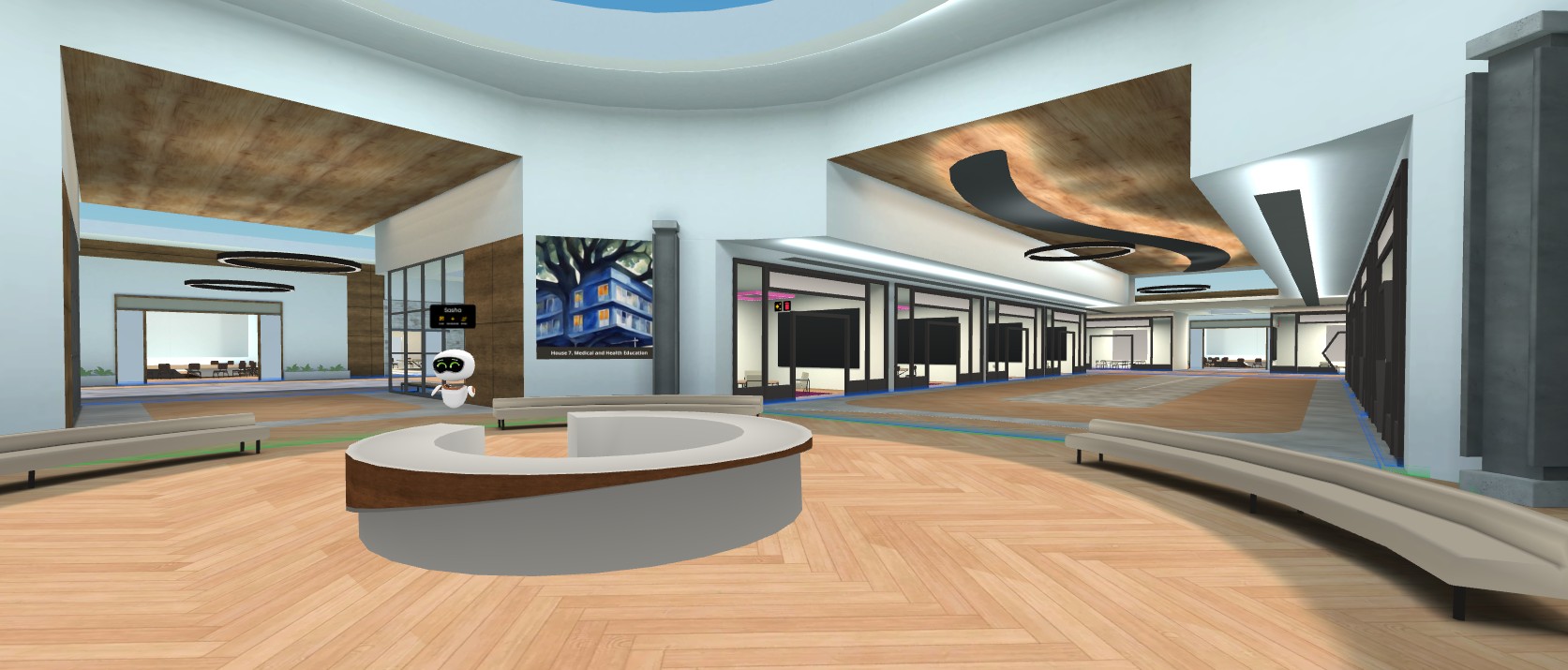
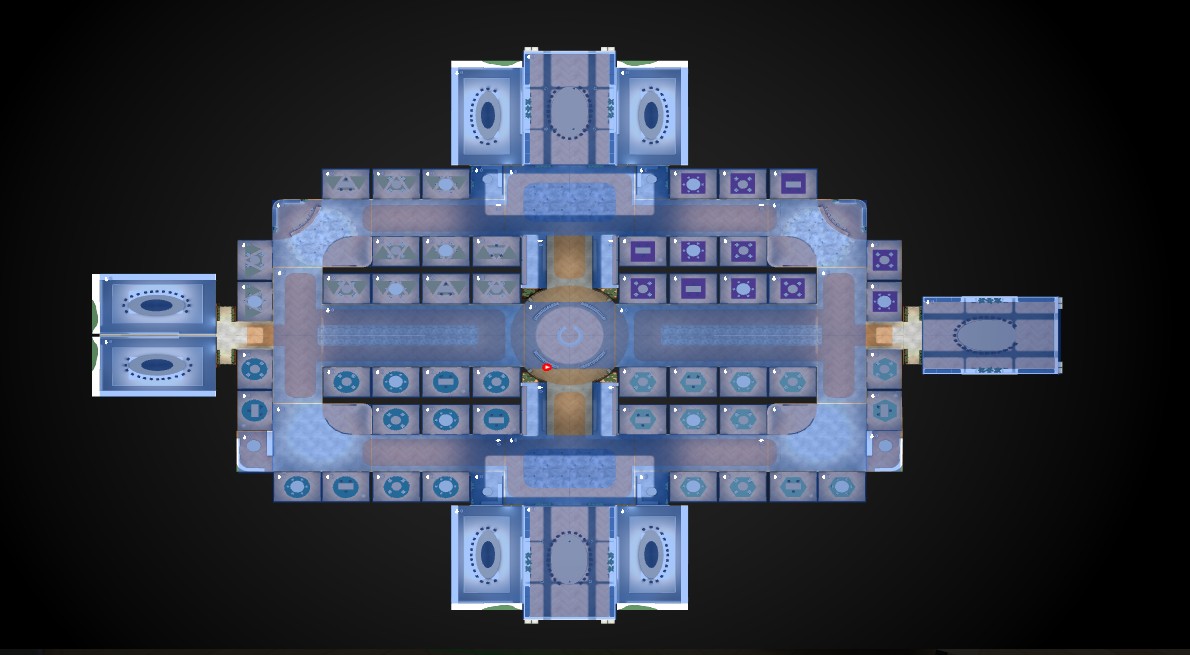
The current House 7 frame includes a gallery, multiple small breakout rooms, and larger conference rooms for presentations or events (shown above). As of January 29, 2026, it has not been decorated or assigned to host regular activities.
BH-07 Medical Education & Healthcare
|
Frame Type |
Branch House |
Status |
OPEN |
|
Track / Branch |
Medical & Health Education |
Capacity |
50 users |
|
FrameVR URL |
|||
Frame Purpose
|
The disciplinary home for immersive learning in medical, nursing, allied health, and healthcare training. This is one of the most evidence-rich domains in XR education, with strong applications in clinical simulation, procedural training, patient communication, and interprofessional education. |
|
Frame type context: Branch House — persistent disciplinary anchor. Medical education has strict requirements around accuracy, safety, and professional standards. All content must be reviewed by a domain expert before posting. |
1 Ownership & Governance
|
Frame Lead / Owner |
|
|
Content Contributors |
|
|
Technical Steward |
|
|
Accessibility Reviewer |
|
|
Last Updated |
|
2 Learning Design Requirements — + UDL 3.0
|
: Emotional well-being is especially salient in medical education contexts — learners are often under significant stress. The Frame should create a psychologically safe environment, consistent with emphasis on emotional state as a determinant of learning effectiveness. |
|
UDL: UDL applied to medical simulation has particular significance: recent research (Doyle et al., 2025) specifically addresses UDL in simulation-based health professions education, noting that inclusive design reduces barriers and fosters psychological safety — critical in high-stakes training contexts. |
|
|
Universal Requirements (all frames) |
Criterion / Pass Threshold |
|
☐ |
Purpose statement posted in Frame at entry zone |
Visible within 10 sec of entering |
|
☐ |
Orientation cues for newcomers (what this space is, what to do) |
Confirmed by blind test with volunteer |
|
☐ |
Asynchronous contribution pathway available (forum, Codex, Discord link) |
At least 1 async pathway; URL live |
|
☐ |
Content accessible in text form via Codex (Representation — UDL) |
Codex page live and linked in Frame |
|
☐ |
No colour-only navigation cues — all zones/portals have text labels |
Confirmed by reviewer |
|
☐ |
Emotional tone is welcoming; language is jargon-free at entry |
Confirmed by reviewer external to Frame team |
|
|
Frame-Specific Requirements |
Criterion / Pass Threshold |
|
☐ |
All clinical content reviewed by a domain expert before posting |
Reviewer name recorded in Section 10 Notes |
|
☐ |
Psychological safety framing present (acknowledgement that this is a learning, not evaluation, space) |
Board or text element present |
3 Design & Build Checklist
|
|
Layout & Purpose |
Criterion / Pass Threshold |
|
☐ |
Frame purpose defined in one sentence, posted at entry |
Written purpose statement visible |
|
☐ |
Environment size matches use case |
Appropriate environment selected; not over/undersized |
|
☐ |
Central meeting / focal area identifiable within 10–15 sec |
Walk-through test by reviewer |
|
|
Navigation |
Criterion / Pass Threshold |
|
☐ |
Minimum 2 outgoing portal links to other Frames |
≥ 2 portals; 0 dead ends |
|
☐ |
Consistent portal visual language (campus-wide asset style) |
Matches campus portal standard |
|
☐ |
Navigation path from entry to any key area ≤ 15 seconds |
Timed walk-through by reviewer |
|
☐ |
All portal destinations confirmed live |
Click-tested by reviewer |
|
|
Signage |
Criterion / Pass Threshold |
|
☐ |
All text legible on mobile screen at default eye level without zooming |
Phone screen test |
|
☐ |
No signage relies on colour alone |
Label or icon accompanies all colour-coded elements |
|
|
Zone Setup (if zones are used) |
Criterion / Pass Threshold |
|
☐ |
'Restrict all assets to zones' enabled if zones are in use |
Frame settings → restrict assets = ON |
|
☐ |
Each zone has a named purpose |
Zone names visible in Frame settings |
4 Performance & Asset Budget — check via Frame Settings → Performance Rating or ?debug=true
|
FrameVR targets: ≤ 200 draw calls · ≤ 130,000 active faces · ≤ 20 materials. FPS target: 60 desktop, ≥ 40 minimum desktop, ≥ 30 iOS Safari. |
|
|
Performance Monitor Readings |
Criterion / Pass Threshold |
|
☐ |
FPS ≥ 40 on desktop (Chrome/Edge) |
Target 60; below 40 = must fix |
|
☐ |
FPS ≥ 30 on iOS Safari mobile |
Must pass before launch |
|
☐ |
Draw call count ≤ 200 |
Babylon Inspector → Stats |
|
☐ |
Active face/poly count ≤ 130,000 |
Babylon Inspector → Stats |
|
☐ |
Material count ≤ 20 |
Babylon Inspector → Stats |
|
☐ |
Performance Rating not flagged RED in Frame Settings |
Yellow = caution; Red = block launch |
|
|
Asset Hygiene |
Criterion / Pass Threshold |
|
☐ |
All images compressed before import (squoosh.app) |
No raw camera/screen captures |
|
☐ |
No Sketchfab model imported without poly-count review |
Flagged models resolved or documented |
|
☐ |
Unused assets deleted (not just hidden) |
Assets list contains only active assets |
|
|
Media Settings |
Criterion / Pass Threshold |
|
☐ |
All videos set to NOT autoplay |
Each video asset → autoplay = OFF |
|
☐ |
Webcam/streaming screens disabled unless live event |
Default OFF; enable only during live sessions |
|
☐ |
No Smoke particle effects in use |
High GPU cost; zero tolerance |
|
☐ |
Animated objects minimised |
Each loop adds ongoing GPU cost |

|
FPS Desktop |
|
|
FPS iOS Safari |
|
|
Draw Calls |
|
|
Poly Count |
|
|
Materials |
|
|
Perf. Rating |
|
5 Content & Boards Checklist
|
|
Codex & Community Links |
Criterion / Pass Threshold |
|
☐ |
Codex page URL embedded as board or link in Frame |
BookStack page URL live and linked |
|
☐ |
Forum / InVision Community thread linked |
Thread URL confirmed live |
|
|
Content Boards |
Criterion / Pass Threshold |
|
☐ |
Image board(s) populated with track-relevant content |
At least 1 board with real content, not placeholder |
|
☐ |
Upcoming events board posted and dated |
Event title + date visible; past events removed |
|
☐ |
Showcase zone set up for presenter / author work |
Distinct area labelled Showcase or equivalent |
|
☐ |
Presenter / author content loaded or linked |
Confirmed with content owner |
|
|
Conference-Specific Elements |
Criterion / Pass Threshold |
|
☐ |
Greek cultural / scavenger hunt artifact placed (if assigned) |
Confirm with George / Greek team |
|
☐ |
Quest clue placed correctly (if this Frame is a quest stop) |
Cross-check against quest master list |
|
☐ |
Tally.so submission form linked (if track accepts submissions) |
Tally form URL confirmed and tested |
6 Planned Activities & Events
|
Activity / Event |
Date |
Owner |
Status |
|
|
|
|
|
|
|
|
|
|
|
|
|
|
|
|
|
|
|
|
7 Connected Frames & Portals
|
Destination Frame |
Portal Type |
Notes |
|
iLRN Central (HUB-03) |
Return portal |
Primary inbound route |
|
Assessment & Evaluation (BH-02) |
Branch-to-Branch |
Clinical assessment methods |
|
Workforce Development (BH-09) |
Branch-to-Branch |
Healthcare workforce training |
|
State of XR (HUB-01) |
Branch-to-Hub |
Large events |
|
|
|
|
|
|
|
|
8 Asset Inventory
|
Asset Name / Description |
Poly Count |
File Size |
Owner |
|
|
|
|
|
|
|
|
|
|
|
|
|
|
|
|
|
|
|
|
9 Accessibility Sign-Off — reviewer must complete this, not the Frame owner
|
|
Wayfinding & Legibility |
Criterion / Pass Threshold |
|
☐ |
New user orients within 10 seconds without prior knowledge |
Blind test with volunteer |
|
☐ |
All text boards legible on mobile at default eye level |
Phone screen test |
|
☐ |
No element identified by colour or spatial position alone |
Confirmed with audio OFF |
|
|
Inclusivity |
Criterion / Pass Threshold |
|
☐ |
No flashing or strobing effects |
Zero tolerance — photosensitivity risk |
|
☐ |
Critical content accessible from a stationary avatar position |
No movement required to read key boards |
|
☐ |
Language on all boards is plain and welcoming to newcomers |
Reviewed by someone outside Frame team |
|
|
Device & Bandwidth |
Criterion / Pass Threshold |
|
☐ |
Fully usable on Chrome / Edge desktop |
Full navigation completed without crash |
|
☐ |
Usable on iOS Safari mobile |
Full navigation completed without crash or major lag |
|
☐ |
Loads within 30 sec on Slow 3G (Chrome DevTools → Network → Slow 3G) |
Slow 3G test completed and passed |
|
|
Sign-Off |
Criterion / Pass Threshold |
|
☐ |
Reviewer name and date recorded below |
Required before Frame status = Ready |
|
Reviewed By |
|
|
Review Date |
|
|
Outcome |
|
|
Follow-Up Items |
|
10 Codex Integration (BookStack)
|
Codex Book / Chapter |
|
|
Codex Page URL |
|
|
Last Synced |
|
|
Outstanding Codex Tasks |
|
11 Additional Notes & Open Questions
|
|
No comments to display
No comments to display